

Skin retouch
Smooth skin, clear blemishes, even tone
ID photo
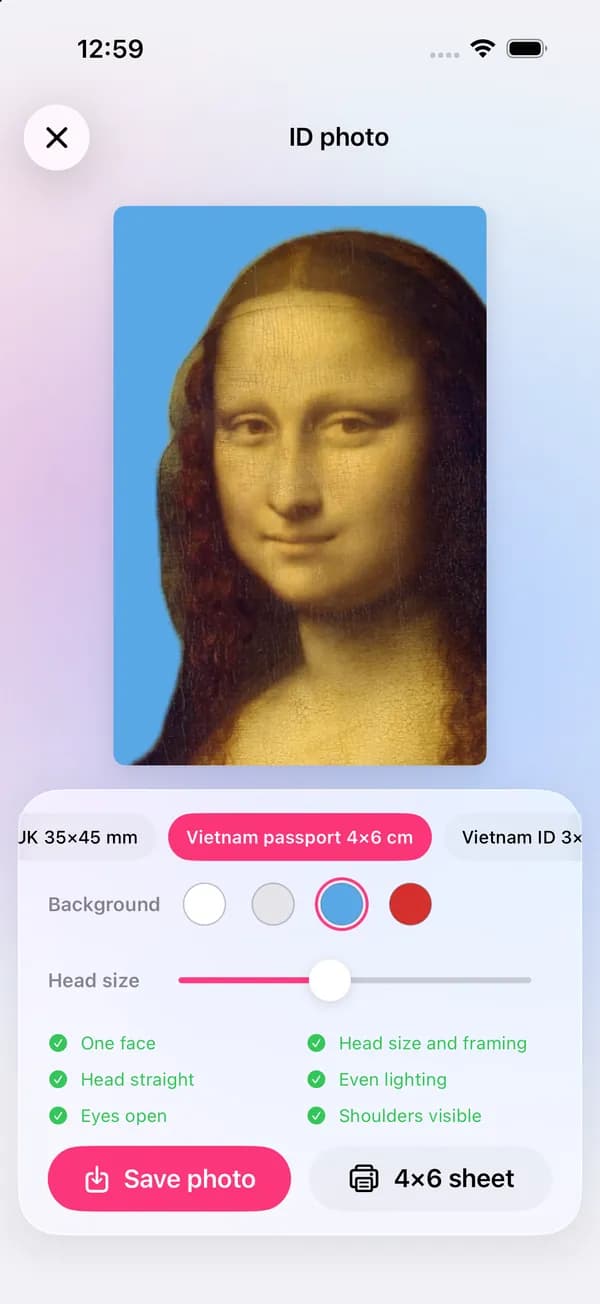
Pick the document size, choose the background color and set the head size. lamdep crops your portrait to the spec, replaces the background and checks the photo before you save it or print a 4×6 sheet.
Where to find it: Android: lamdep on Google PlayiPhone: Open brAIn on the App Store
How it works
Use a photo where you look straight at the camera, with your shoulders in the frame.
Pick the document size and a white, light gray, blue or red background, then set the head size.
Review the six checks, then save the single photo or a 4×6 sheet to print.
On iPhone (Open brAIn): Portrait › ID photo
What you get
US passport 2×2 in, Schengen and Japan 35×45 mm, UK 35×45 mm, Vietnam passport 4×6 cm, Vietnam ID 3×4 cm and China 33×48 mm.
Your portrait is cut out on the phone and placed on a flat color, so a busy room behind you is not a problem.
One face, head size and framing, head straight, even lighting, eyes open and shoulders visible.
ID photos are made entirely on your phone, with no upload and no credits.
Guide
Stand about an arm's length from a plain wall, facing a window so your face is evenly lit, with no shadows behind you. Look straight into the camera with a neutral expression, mouth closed, and keep hair away from your eyes.
Take off glasses if the document's rules ask for it (many now do), and avoid hats or anything that hides the outline of your face. Use the newest photo you can: most documents want one taken in the last six months.
Questions
lamdep sizes and checks the photo against the common rules for each format, but the authority that issues your document decides. Always read its current photo requirements before you print or upload.
US passport 2×2 in, Schengen / Japan 35×45 mm, UK 35×45 mm, Vietnam passport 4×6 cm, Vietnam ID 3×4 cm and China 33×48 mm.
Save the 4×6 sheet. It fits several copies on a standard 4×6 in (10×15 cm) print, which any photo kiosk or print shop can make.
Light retouching such as evening out skin tone is fine for most documents, but many authorities reject photos that change your appearance. Keep it natural.
Yes. It runs on your phone and uses no credits.
Smooth skin, clear blemishes, even tone
Clean cutouts, new colors or blur
Studio light on any portrait
Free to download for iPhone and Android. Pro tools and AI credits are optional.