

Auto captions
Styled captions from speech, on your phone
Teleprompter
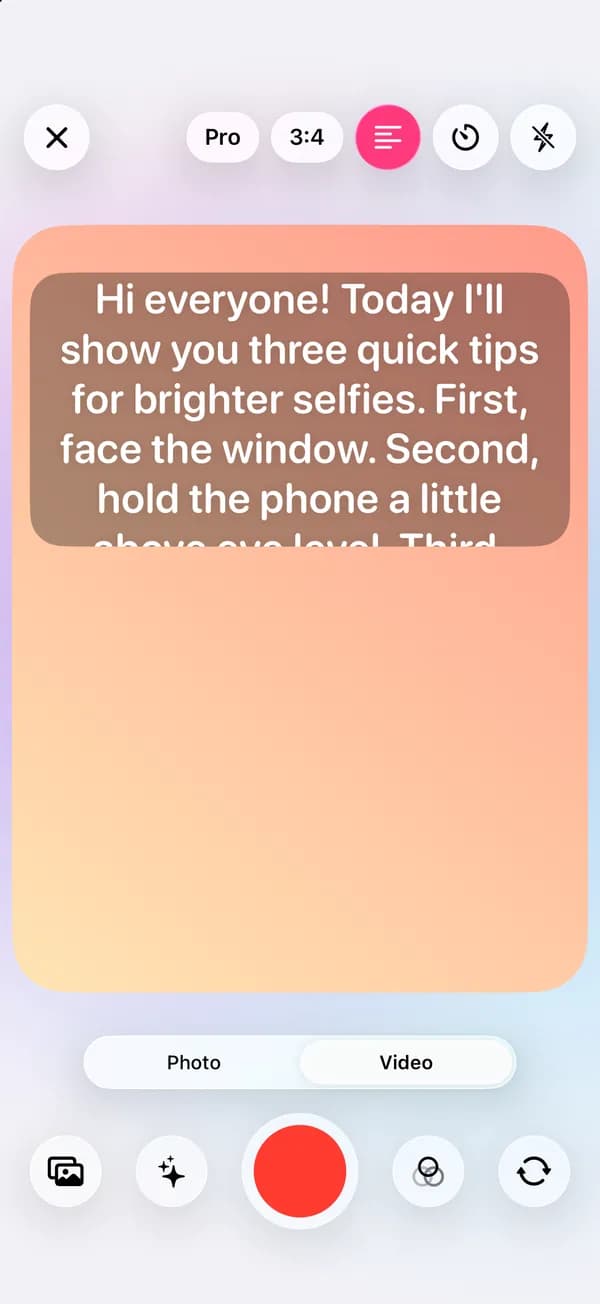
Paste your script and it scrolls over the camera preview while you record, close to the front lens. Set the speed and text size, tap to pause, and keep live beauty on while you talk.
Where to find it: Android: lamdep on Google PlayiPhone: Open brAIn on the App Store
How it works
Open the camera, switch to Video and tap the teleprompter button.
Type or paste it, then set the speed, text size and countdown.
Tap record and read as it scrolls. Tap the text to pause or resume.
On iPhone (Open brAIn): Beauty cam › Video › Teleprompter
What you get
The script sits at the top of the screen, right by the front camera, so you keep eye contact with viewers.
Adjust the scroll speed and text size, add a countdown, and pause with a tap.
Flip the text when you read it through a mirror or reflector glass.
Open the clip in the video editor to cut it and add auto captions.
Guide
Write the way you speak: short sentences, one idea each. Read it aloud once before recording and set the speed a little slower than feels natural; you can always speed up.
Hold the phone at eye level, about an arm's length away, with a window in front of you. Smaller text keeps your eyes closer to the lens, so viewers see you looking at them.
Questions
Yes. It is part of the camera and needs no account.
Yes. Tap the text to pause or resume the scroll.
No. The text is only on your screen and is not recorded.
Yes. Live beauty stays on in Video mode, so the clip looks like the preview.
Yes. Open the clip in the video editor to trim it, add music and auto captions.
Styled captions from speech, on your phone
Multi-track timeline, effects and video beauty
Live beauty, makeup and AR effects
Free to download for iPhone and Android. Pro tools and AI credits are optional.