

Text & stickers
Add text, stickers, doodles and frames
Collage
Choose 2 to 9 photos and lamdep lays them out for you. Change the layout and the ratio, round the corners, set the spacing and background, and drag each photo into place.
Where to find it: Android: lamdep on Google PlayiPhone: Open brAIn on the App Store
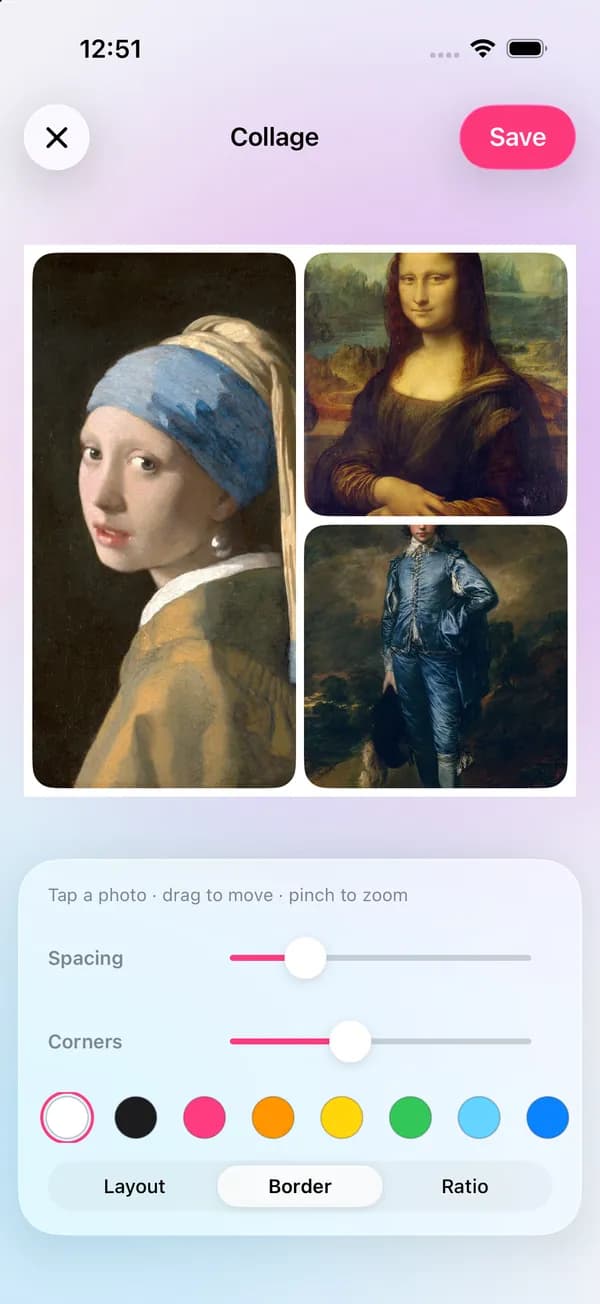
How it works
Open Collage and choose 2 to 9 photos from your library.
Try layouts and ratios, then set spacing, corners and the background color.
Drag to move, pinch to zoom, tap two photos to swap them, then save.
On iPhone (Open brAIn): Edit › Collage
What you get
Ratios for square posts, portrait posts and full-screen stories, so nothing important gets cropped.
Pan and zoom each photo inside its cell, and swap photos between cells with a tap.
More layouts, such as story, scrapbook, instant-print and film-strip templates, come in packs from the Store.
Add text, stickers, a frame or a look to the whole collage before you share it.
Guide
Pick one photo to lead and give it the largest cell, then add photos that tell the rest of the story: a wide shot, a detail, a face. Photos with similar light and color look calmer together; apply the same look to all of them first if they don't match.
Thin, even spacing keeps a collage tidy; wider spacing with rounded corners feels more playful. Leave space for text if you plan to add a title, and check that faces don't sit right on a cell's edge.
Questions
From 2 to 9.
Yes. Collage and its built-in layouts are free. Some template packs in the Store include Pro templates.
Yes. Pick the tall full-screen ratio, then add text or stickers in the editor.
Yes. A burst of shots from the camera can go straight into a collage.
No. Collages are made on your phone.
Add text, stickers, doodles and frames
Looks, curves, color grading and masks
Multi-track timeline, effects and video beauty
Free to download for iPhone and Android. Pro tools and AI credits are optional.