

Skin retouch
Smooth skin, clear blemishes, even tone
Re-light
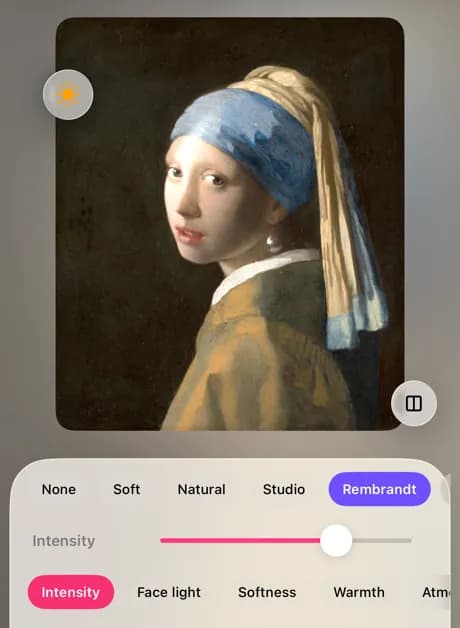
Re-light adds light to a face as if you had placed a lamp: pick a classic portrait setup or a mood, drag the light source, and set its strength, softness and warmth. It runs on your phone.
Where to find it: Android: lamdep on Google PlayiPhone: Open brAIn on the App Store
How it works
In the editor's Beauty tools, open Re-light. It needs a face that fills a fair part of the photo.
Soft, Natural, Studio, Rembrandt, Butterfly, Split, Sunset or Neon.
Drag the light source, then set intensity, face light, softness, warmth and color.
On iPhone (Open brAIn): Portrait › Relight
What you get
Rembrandt, butterfly and split light are the setups photographers use in the studio, now one tap away.
Sunset and neon add colored light and atmosphere for a whole different feel.
A dull photo taken under ceiling light gets shape and direction back.
Re-light works out the face's shape on your phone; the photo is never uploaded.
Guide
Rembrandt light comes from one side and slightly above, leaving a small triangle of light on the far cheek: dramatic but flattering. Butterfly light sits in front and above, for a glamorous look with a soft shadow under the nose. Split light lights exactly half the face, for strong, moody portraits.
For everyday photos, Soft or Natural at low intensity adds shape without looking edited. Match the light's direction to the window or sun already in the photo and the result looks real.
Questions
Re-light is a Pro tool. You can try it on any photo, and free users get a few Pro saves each week.
Re-light reads the shape of the face to light it. Crop closer or use a photo where the face is bigger.
Re-light lights the face you select. For the most natural result, use it on portraits of one or two people.
Re-light is in the photo editor. The camera has its own live skin and makeup tools.
No. Re-light only changes light and color; it never reshapes the face.
Smooth skin, clear blemishes, even tone
Portrait-mode blur and bokeh for any photo
Passport and ID photos at the right size
Free to download for iPhone and Android. Pro tools and AI credits are optional.