Film camera
Shoot through a film roll, with a date stamp and borders
FX camera
Switch the camera to FX and the viewfinder already wears the effect: Dream haze, Neon night, Y2K flash or a lost TV signal, with snow, glitter or bokeh drifting through the frame. Turn on Behind me and only the background takes the effect.


Where to find it: Android: lamdep on Google PlayiPhone: lamdep on the App Store
How it works
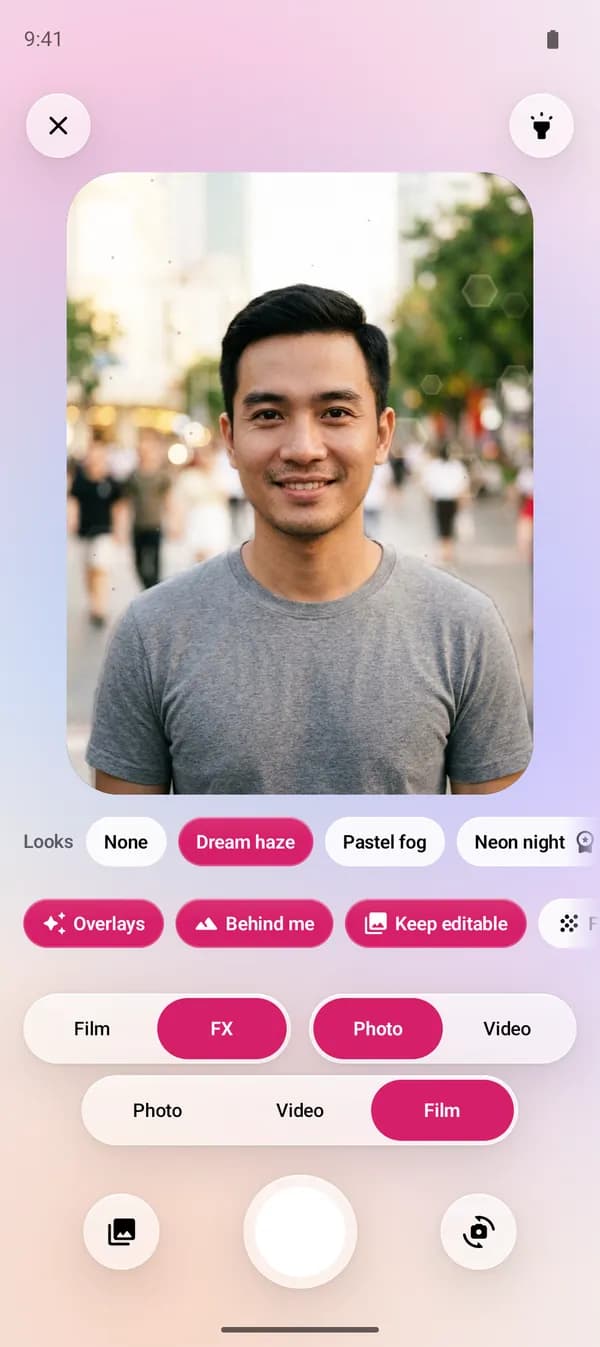
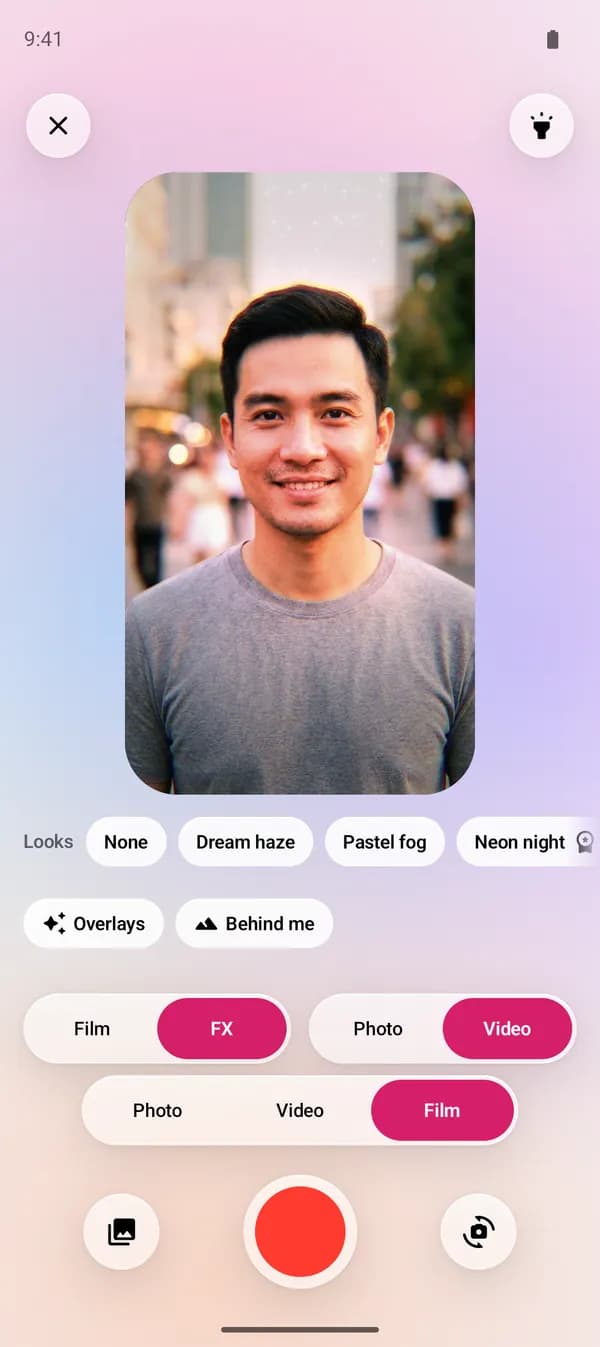
In the Camera tab, choose Film, then FX in the Film | FX switch, then Photo or Video.
Tap a look in the Looks row. Turn on Overlays and choose one, and tap Behind me to keep the effect off you.
Press the shutter, or record up to 60 seconds. It saves to your gallery; tap the last shot to see it or, for a photo, Edit look.
What you get
The look and the overlay move live in the viewfinder, so you frame for the effect.
Behind me puts the effect on the background and the overlay behind you.
FX never smooths, reshapes or tracks your face. What you see is the look.
Keep editable saves the photo’s original and recipe, so you can swap the look afterwards.
A look is a small stack of effects made to work together: a soft glow with a light leak, a glitch with a tracking tear, grain with a faded print. FX brings 24 of them in six moods. Tap one and the viewfinder changes at once. Some looks move on their own: sparkles twinkle and glows breathe while you frame.
Sixteen looks are free. Eight are part of lamdep Pro and carry a crown: try them as long as you like, and the shutter then uses a weekly free Pro save or asks for Pro. Looks installed from the Store join the row, and looks you save in the photo editor (Effects › Looks › Save as my look) appear under My looks.
Turn on Overlays and pick one of eight moving layers. They are drawn by the app’s own code rather than played from a stock video, so they stay sharp at any size. One overlay runs at a time, on top of the look: a soft look with Glitter fall, or a plain frame with Rain.
In a video the overlay moves for the whole clip. A photo keeps the instant you pressed the shutter, with snowflakes or dust frozen mid-air. With Behind me on, the overlay passes behind you instead of across your face.
Behind me finds the person in the frame live with an on-device segmentation model. Effects that tint, blur, glow or glitch the whole frame go to the background only, and the overlay goes behind you. Effects that bend or move the whole picture still cover the full frame, so the shot stays in one piece.
You get a dreamy or glitchy scene without washing out your skin or covering your eyes in snow. The mask follows you and is smoothed so its edge does not jitter. Fine hair against a busy background can show a soft edge.
Photo shoots a 3:4 picture, rendered from the full-size capture with the look and overlay as the viewfinder showed them. Video records a vertical 9:16 clip of up to 60 seconds at 1080p and 30 frames per second, with sound if you allow the microphone. Recording stops on its own at one minute.
If your phone’s camera can record 4K, a 1080p | 4K switch appears, and 4K clips are saved at 30 frames per second in HEVC. Keep editable is for photos: the original and the recipe are kept, so Edit look reopens the shot in the editor. Videos keep the effect baked in.
Use cases
Dream haze with Glitter fall and Behind me: the guest of honour stays clear while the party sparkles around them.
Neon night or City sparkle on street lights, recorded as a 9:16 clip for Reels, Shorts or TikTok.
Signal lost, Broadcast 90s or Glitch pop with Static for a lip-sync or a dance clip.
Snow drifting over a shop window for a winter sale story.
Golden rays and Floating dust turn a sunset photo on the beach into a warm, hazy keepsake.
Guide
Effects follow the light that is already there. Glow, haze and ray looks need something bright in the frame, such as a window, a lamp or the low sun, and sparkles shine on small points of light like fairy lights or candles. In flat, dim light, pick a stronger look.
For Behind me, stand a step or two away from the wall and keep some contrast with the background, like a light top against a dark room. Move smoothly; quick turns can leave the edge a moment behind.
Keep videos short: ten to twenty seconds is plenty for a story. 9:16 is already the shape vertical platforms expect, so nothing needs cropping. 4K files are much larger, so choose 4K when you plan to edit or crop, and 1080p for quick sharing.
The FX camera plays each look on the viewfinder, so what you see is what you save. In this Short a look is tapped, an overlay is switched on and kept behind the person with Behind me, and the shot is taken with the look baked in. 24 looks are built in, for photos and videos alike.
Privacy
Everything in FX runs on your phone: the looks, the overlays (drawn by the app’s own code, nothing downloaded) and the Behind me person mask. FX does no face analysis. Nothing you film is uploaded. Store looks are small downloads, under 1 MB each, fetched only when you install them. The microphone is used only while you record, if you allowed it.
Photos are saved to Pictures/lamdep and videos to Movies/lamdep. With Keep editable, the original and its recipe also stay in the app’s own storage; Me › Delete kept originals removes them, and your saved photos stay in your gallery.
Questions
lamdep is free to download. Sixteen of the 24 looks and all eight overlays are free. The eight Pro looks can be tried freely; saving with one uses a weekly free Pro save or needs lamdep Pro.
Android 10 or later. On older versions the Film mode has no Film | FX switch. 4K video appears only where the camera can record it.
No. FX runs no beauty, reshaping, face tracking or AR effects. Behind me only separates you from the background.
Up to 60 seconds; recording stops on its own at one minute.
Yes, if Keep editable was on: tap the last shot, then Edit look, to reopen the original in the editor. Videos keep their effect.
The film camera shoots through film rolls with grain and light leaks. The AR camera is for live beauty and face effects. Video effects are added to clips later in the video editor. FX puts bold looks and moving overlays on the shot as you take it.
Shoot through a film roll, with a date stamp and borders
Live beauty, makeup and AR effects
Sketch, glitch, sparkle and light effects, in layers
Glitch, echo, light and snow effects as timeline clips
Free to download for iPhone and Android. Pro tools and AI credits are optional.