
Video editor
Multi-track timeline, effects and video beauty
Transitions
Tap the cut between two clips and choose how one scene turns into the next: a soft dissolve, a whip pan, a zoom punch, a light sweep or a glitch, with every thumbnail a live preview made from your own clips.


Where to find it: Android: lamdep on Google PlayiPhone: lamdep on the App Store
How it works
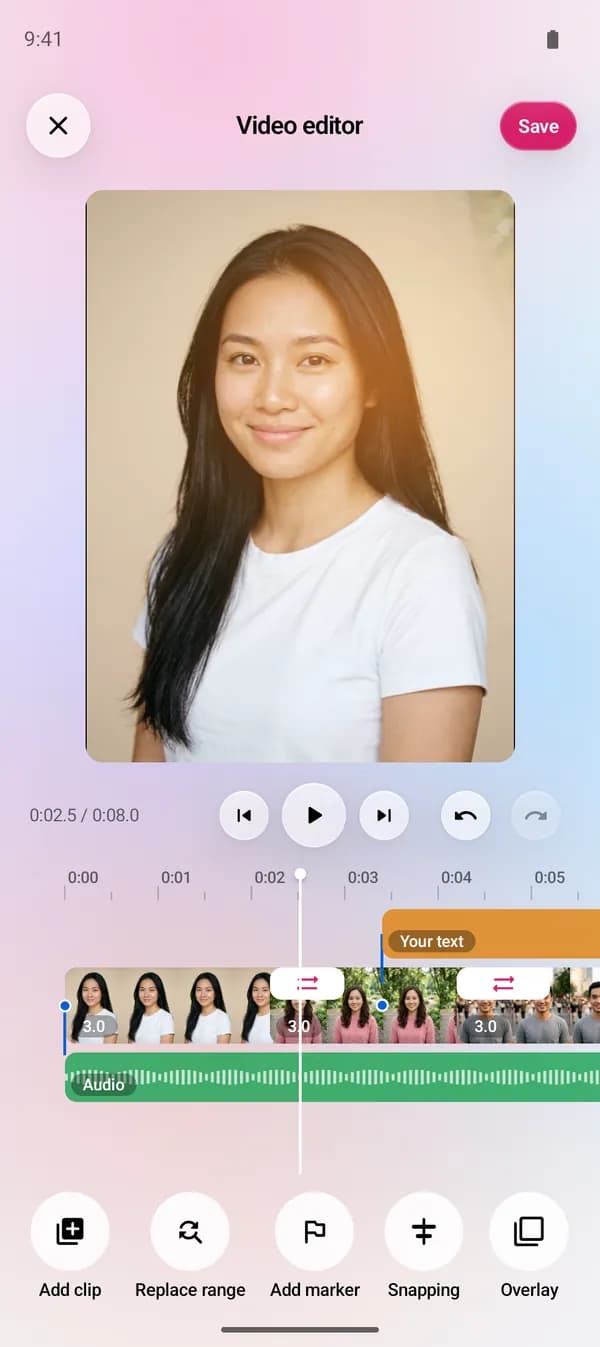
From Home › All tools, open Video editor, tap New project and add videos and photos with Add clip. They line up on the main track, and every cut between two clips gets a small transition button.
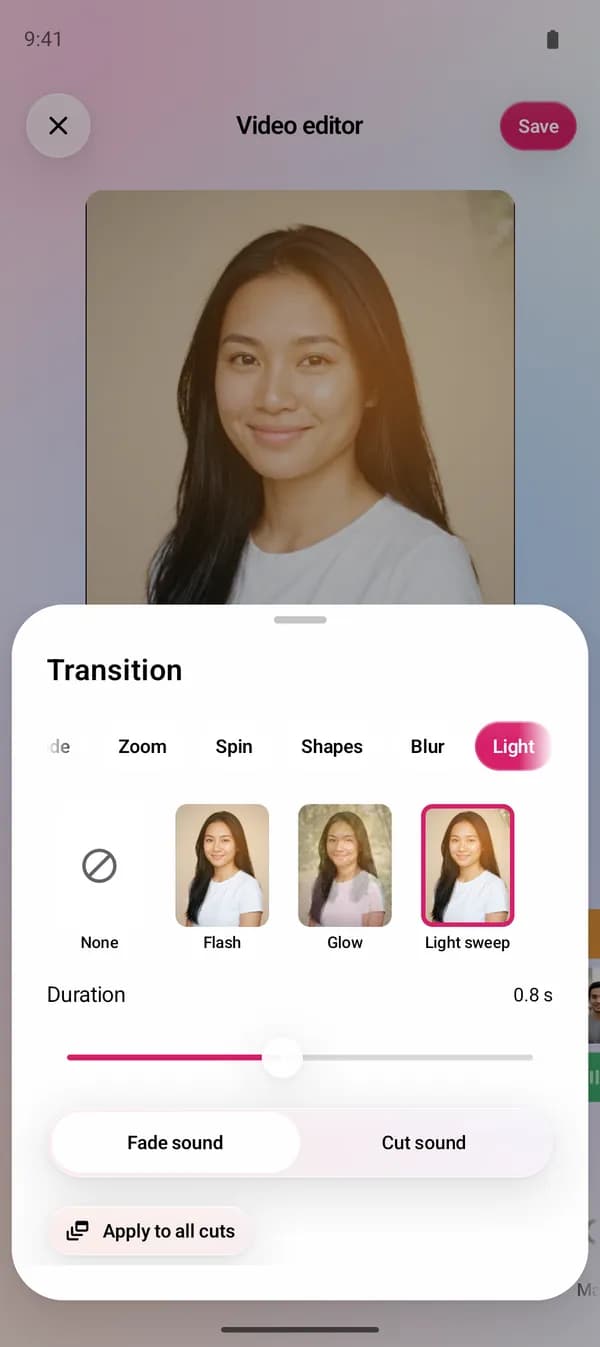
Tap that button to open the Transition sheet. Choose a category chip, then a design; each thumbnail shows it on the frames on either side of the cut. None takes it off again.
Move Duration, choose Fade sound or Cut sound, and tap Apply to all cuts if you want the same look everywhere. Tap Save to export the video to your gallery.
What you get
Thumbnails come from the two frames at the cut, so you judge the real result, not a stock demo.
Apply to all cuts copies design, length and sound to the whole video as one undoable step.
Fade sound crossfades the clips’ audio; Cut sound switches it in the middle of the transition.
Transitions belong to the free video editor and are drawn by the app’s own engine.
The library holds the ten classic transitions (Dissolve, Fade to black, the slides and pushes, Zoom in, Spin) plus 30 newer designs, sorted under eight category chips so you jump straight to the move you want.
Each design decides how the outgoing and incoming clips move, fade, are revealed by a shape or are touched by an effect such as motion blur, a light leak or digital noise. Because the thumbnails use your own frames, you see how a Heart or an Iris sits on your close-up before you commit.
Short vertical videos live on energy. Light sweep wipes the next clip in along a soft, slanted edge with a light-leak glow, Flash bursts into light and switches clips at its peak, and Glow brings the next shot in with a soft bloom. Glitch cut tears the picture with glitch and color-split noise, Signal adds VHS-style distortion and shake, and Static crossfades through grain.
For impact, Punch zooms hard into the first clip with blur and a shake before the next one lands, Zoom through flies through the frame, and Pop springs the new shot in from a tiny point. Whip and Whip up imitate a fast camera swing. Flash, Punch, Glitch cut and Signal also switch the sound at the midpoint by default, so the cut hits like an edit on the beat.
Duration runs from 0.2 to 3 seconds, and a new transition starts at 0.5 s. The real limit is half of the shorter clip at the cut: a 2-second photo next to a long video allows at most 1 second. A transition overlaps the end of one clip with the start of the next, so the video gets shorter by its length.
On the timeline, a cut with a transition shows a chip as long as the overlap. Drag it sideways to change the length: it grows on both sides of the cut and is applied when you let go, as one undo step.
Slideshows and photo dumps usually look best with one consistent move. Set up one cut the way you like it, then tap Apply to all cuts: the design, its length and the sound setting go to every cut on the main track in one step, and Undo brings back what was there before.
Then adjust the exceptions by hand: a Fade to black before the closing shot, a Heart on the couple photo, or None where two clips should simply cut. Transitions sit only on the cuts of the main track; the first clip has no cut before it, and overlays, text and stickers don’t take one.
Use cases
Glide between places, and a Whip for the jump from the airport to the beach.
Pop or Iris to reveal each product, with Apply to all cuts for an even rhythm.
Soft cross between photos, a Heart for the big moment, Fade to black at the end.
Punch, Flash or Glitch cut on the strong beats, with Cut sound for a hard edit.
Guide
A plain cut is still the strongest transition. Keep it when the action continues across the edit, in a talking-to-camera video, or when two shots already match in movement. Save transitions for a change of place, time or mood.
Let the music set the timing. Put cuts on beats, and remember that Flash, Punch, Glitch cut and Signal switch the picture in the middle of the chip, so center the chip on the beat. For smooth designs, match the length to the tempo: at 120 BPM one beat lasts 0.5 s, so 0.5 or 1 s feels natural.
Keep one family per video, two at most, and start from Apply to all cuts. For Reels, TikTok and Shorts, 0.2–0.5 s keeps the pace up; slideshows and YouTube vlogs breathe better at 0.8–1.5 s; go beyond 2 s only for slow, moody pieces. Before you save, scrub through every cut once.
This Short puts three video editor tools together. The transition sheet previews each effect on your own clips; a keyframe curve shapes how exposure or warmth changes over time; and a motion path, bent with a finger, makes a clip glide along a curve. Everything plays back in the editor before you export.
Privacy
Transitions are drawn by lamdep’s own engine on your phone: the live thumbnails, the preview and the final export. The 40 designs ship inside the app, so nothing is downloaded when you open the sheet, and your clips are not uploaded anywhere to make a transition.
Clips you add are copied into the project’s folder on the phone, and the project stays in Video projects so you can come back to it. Save writes the finished video to your gallery, in the lamdep album under Movies.
Questions
Yes. They are part of lamdep’s free video editor, and none of the 40 designs is locked to lamdep Pro. The app is free to download.
From 0.2 to 3 seconds, but never longer than half of the shorter clip at the cut. A new transition starts at 0.5 s.
A transition overlaps the end of one clip with the start of the next, so each one takes its length off the running time.
Tap its chip on the timeline to open the Transition sheet and choose None, or tap Undo right after adding it.
With Fade sound the two clips’ audio crossfades; with Cut sound it switches in the middle. Each design has its own default.
No. Transitions go on the cuts between clips on the main track, and the first clip has no cut before it.
Multi-track timeline, effects and video beauty
Glitch, echo, light and snow effects as timeline clips
Animated intros, name bars and end cards for video
Animate any slider with keyframes, eases and paths
Free to download for iPhone and Android. Pro tools and AI credits are optional.