Retro video looks
Camcorder, home movie and cine looks for your clips
Video effects
In lamdep’s video editor every effect is a clip you place on the timeline: classic glitch and VHS effects, art, lens and light effects, time effects that build on earlier frames, and moving overlays such as snow and glitter. Everything runs on your phone, and it is free on video.


Where to find it: Android: lamdep on Google PlayiPhone: lamdep on the App Store
How it works
Open Video editor on the Home screen, start or open a project, move the playhead to where the effect should begin and tap Effects.
Pick a chip (Video, Time, Art, Retro, Color, Lens, Geometry, Signal, Light or Overlays) and tap a tile. A 3-second effect clip lands at the playhead, its panel open.
Set Amount and the effect’s controls, drag the clip’s edges to change its length, then tap Export. The video goes to the lamdep album in your gallery.
What you get
Trim, move and stack effect clips on their own lanes; every change is one undo step.
Library tiles show the frame under the playhead with each effect, so you choose on your own footage.
Amount and the main controls take keyframes: fade an effect in, peak on a beat, fade it out.
Set an effect to Main track and it stays under your titles and stickers.
The Video chip holds the editor’s eight classic effects, each with Intensity and Speed. Glitch tears bands of the picture sideways, RGB split pulses the colour channels apart, VHS adds scan lines, faded colour and tape noise, and Shake gives a burst of handheld energy.
For a harder digital look, the Signal chip adds Signal glitch, Pixel drift, Crunch, Broadcast, Tube and Tracking tear: broken streams, heavy compression, old TV sets and a rolling tape tear. A glitch reads best when it is short, so trim the clip to half a second and lay it across a cut or the moment a beat drops.
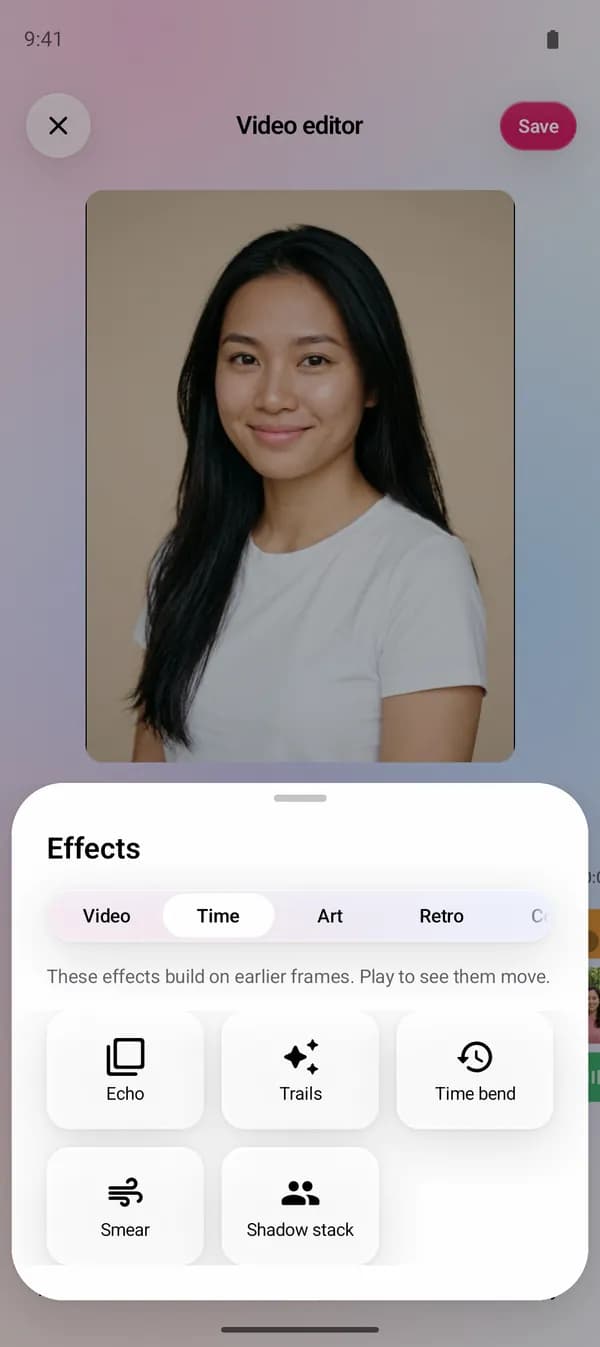
The Time chip, right after Video, holds five effects whose picture builds on earlier frames. Echo layers up to 16 fading copies of earlier frames, with an optional colour shift. Trails leaves glowing paths behind bright lights, Time bend shows a different moment in each row, column or ring, Smear drags the image along the motion, and Shadow stack sets coloured copies of a person’s outline behind them.
A still tile cannot show this, so the tiles are icons and the effect appears when you press play. Paused on a frame, the app first renders the frames before it; if that takes a moment, “Preparing the effect…” appears. Use these effects where something moves: dancing, spinning, sports, city lights at night.
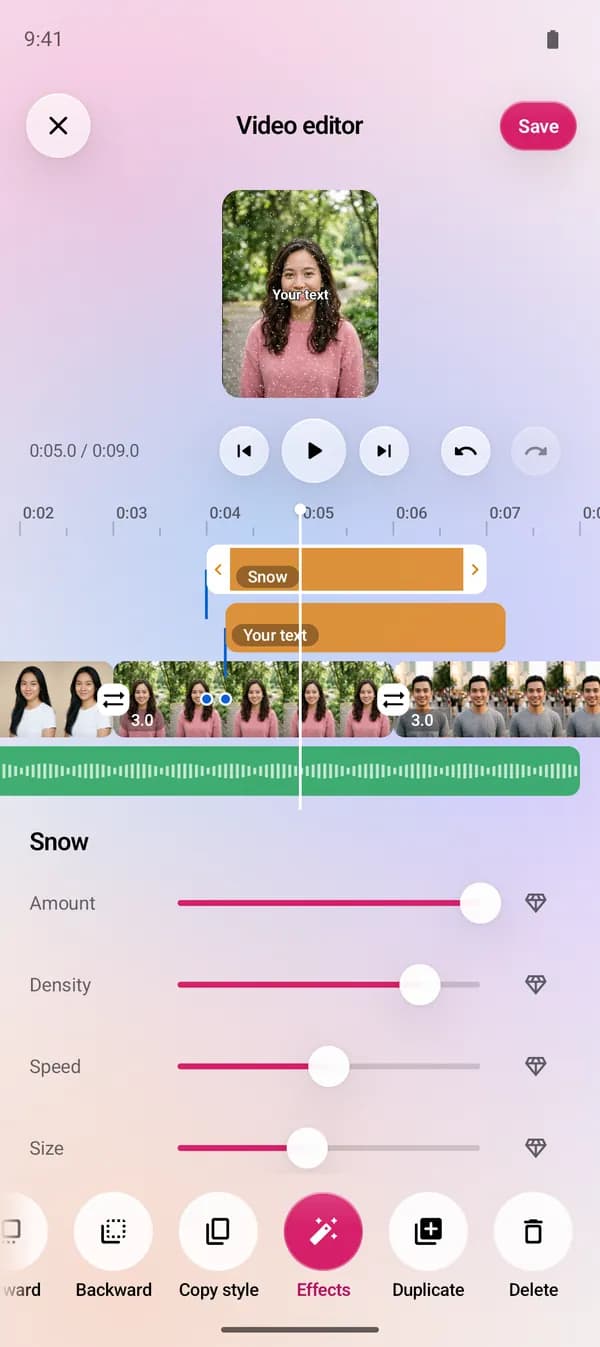
Overlays, the last chip, adds particles and light that the app draws frame by frame, so nothing is pasted from a stock clip and they stay sharp at any size. The panel offers Amount, Density, Speed and Size (all four keyframable), Colour (the overlay’s own or eight palette swatches), Blend (Screen, Add, Overlay or Soft light) and Behind subject.
Behind subject finds the person on your phone and draws the snow or glitter behind them, so flakes fall past the hair instead of across the face. Overlay clips may overlap, and they are drawn on top of every other effect in the frame, so Floating dust over a Light leak just works.
The photo editor’s effects library works on video too. Art has Ink sketch, Pencil, Oil, Wash, Comic dots and Poster. Light adds Twinkle stars on highlights, Streaks, Sun rays and Lens ghosts. Lens brings Soft glow, Tilt-shift, Star filter and more; Color has Duotone and Keep one color; Geometry folds the frame with Mirror, Kaleido, Little planet or Fisheye.
A library clip has Amount, the effect’s own controls, Blend (Normal, Screen, Add, Overlay, Soft light or Multiply; not for Geometry, which acts on the whole frame) and Whole video or Main track. The Retro chip opens with three video looks, Camcorder, Home movie and Cine, which have their own page.
Use cases
Glitter fall behind the guest of honour and Twinkle on the candles, starting with the song.
Snow with Behind subject on and a touch of Soft glow.
Echo or Trails through the chorus and a half-second Glitch on each hard cut.
Star filter on jewellery, Zoom burst on the reveal, prices kept clean on Main track.
Rain on a city street at dusk and Film burn between days.
Guide
Time effects to the edit. A new effect clip lasts 3 seconds, which suits a mood such as snow, but glitches and shakes work best for a fraction of a second on a cut or a beat. Keep one or two effects as a video’s signature, and keyframe Amount to fade them instead of switching them on hard.
Shoot for the effect. Echo, Trails and Smear need movement against a steady background, so hold the phone still and let the subject move. Trails and Twinkle feed on bright points: lamps, candles, sun on water. Shadow stack and Behind subject need a person who stands out from the background.
On busy footage, lower an overlay’s Density before its Amount, and try Screen or Soft light. Watch a full play-through before you export: time effects only show their motion while playing.
Privacy
Every effect and overlay is drawn on your phone by the app’s own engine. Overlays are generated from maths, not downloaded images, and no frame of your video is uploaded. Shadow stack and Behind subject find the person’s outline on the device.
Projects stay in the app on your phone, and an exported video is saved to the lamdep album in your gallery, ready for Reels, TikTok, Shorts or a message.
Questions
Yes. The effects, time effects and overlays are free on video, and lamdep is free to download.
Tap Effects, then Glitch, RGB split or VHS under Video, or Signal glitch under Signal. Trim the clip short and place it on a cut.
Tap Effects › Overlays and choose Snow or Glitter fall. Turn on Behind subject so it falls behind the person.
Time effects use earlier frames; when you pause, the app renders those frames first.
Yes. Effect clips can sit on separate lanes and overlap. Overlays are always drawn on top.
Only when set to Whole video. On Main track it applies to your footage, under titles and stickers.
No. Nothing reshapes a face or body; the person’s outline is only used to place an effect behind them.
Camcorder, home movie and cine looks for your clips
40 transitions between clips, previewed on your own footage
Sketch, glitch, sparkle and light effects, in layers
Shoot through live looks and moving overlays
Free to download for iPhone and Android. Pro tools and AI credits are optional.