Film filters
Film looks, date stamps and film borders for photos
Photo effects
Effects in the lamdep photo editor turns a photo into an ink sketch, a glitchy TV frame or a night full of sparkles. Pick from 35 effects or a ready-made look, stack up to four layers, and choose whether each covers the whole photo, the person or the background.


Where to find it: Android: lamdep on Google PlayiPhone: lamdep on the App Store
How it works
Open a photo in the editor and tap Effects in the tool bar. Choose a category, or Looks for ready-made combinations.
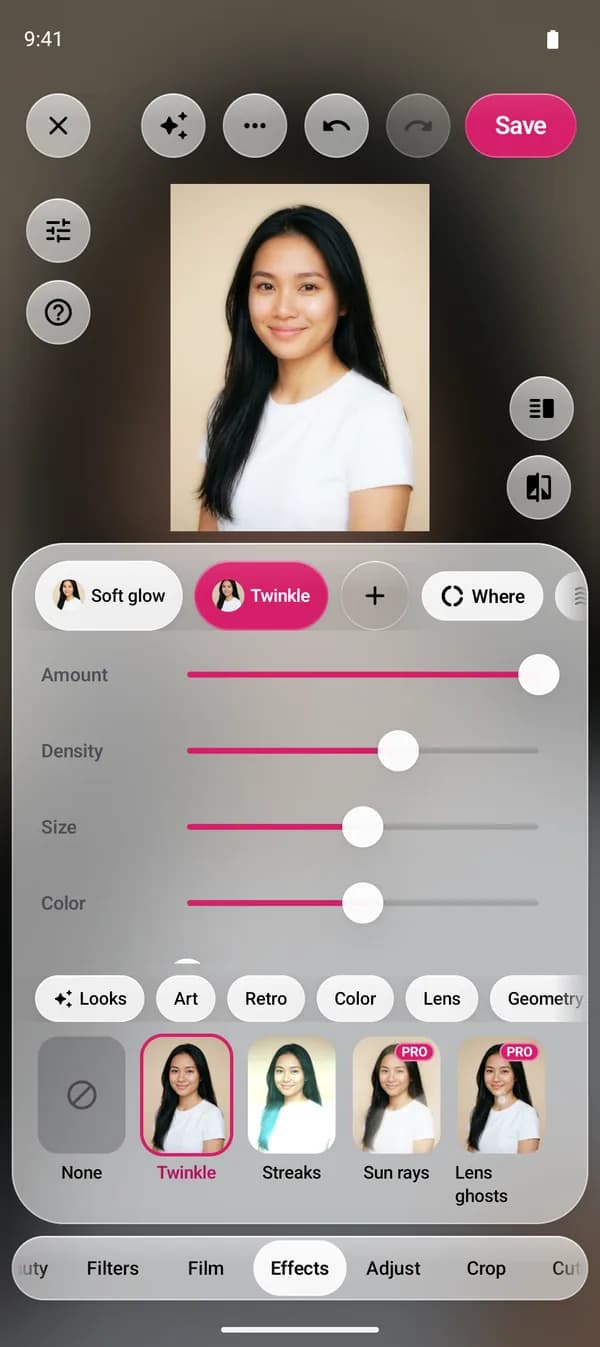
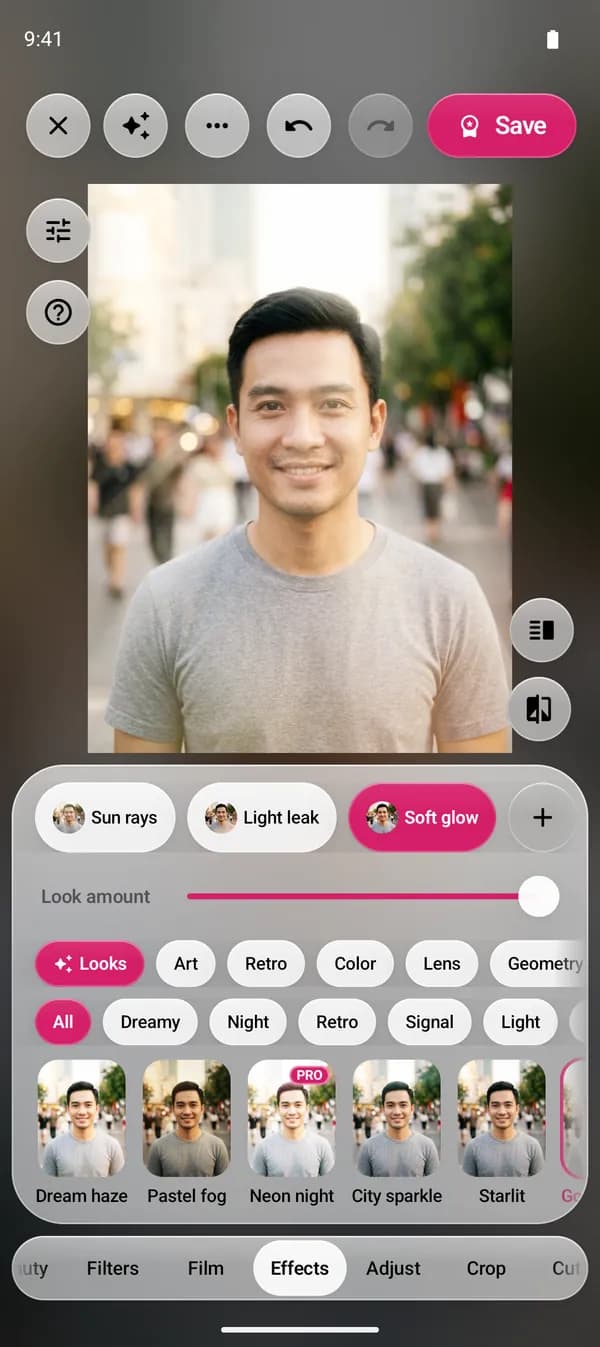
Tap an effect; the thumbnails show each one on your photo. Set Amount and the sliders, then tap + to add a layer and choose a Blend.
Tap Where to keep the layer on the subject, the background or an object you tap. Then tap Save and Save to Photos.
What you get
Art, Retro, Color, Lens, Geometry, Signal and Light: 35 effects in all.
Stack up to four effects and mix them with six blend modes.
Whole photo, subject, background, one person, hair, clothes, a tapped object or your own brush.
Effects and looks render on the device. Your photo is not uploaded.
Art turns a photo into a drawing. Ink sketch traces dark lines on a warm paper tone, Pencil turns shading into graphite, Oil smooths areas into brush-like patches, Wash softens it into watercolor on textured paper, Comic dots reprints it as halftone dots, and Poster flattens colors into bold steps with outlines. A Size slider sets the line or dot scale.
Retro adds Grain & dust, a Light leak you can turn to any angle, Tape with shifted color and scan lines, and Faded print. In Color, Duotone and Gradient map recolor by brightness with two hues you pick, Keep one color turns everything but one hue grey, and Color flash lights the center like a flash with a colored gel. For full film looks with a date stamp, lamdep has a separate Film tool.
In Signal, Signal glitch slides bands of the picture sideways, Pixel drift sorts runs of pixels by brightness in one of four directions, Crunch imitates an over-compressed image, Broadcast bleeds color like an analog TV, Tube draws an old CRT screen, and Tracking tear rolls noisy bands across the frame, VHS-style.
Light builds on what is bright in your photo. Twinkle puts star sparkles on highlights, with Density, Size, Color and 4, 6 or 8 points. Streaks stretches lights into long colored lines, while Sun rays and Lens ghosts start from the brightest spot; drag their handle to move the light.
A photo can hold up to four effect layers. Tap + and the next effect you pick goes on top; drag a pill to reorder, or long-press it to hide, duplicate, move or delete it. Each layer works on the result of the ones below, and Blend mixes it in as Normal, Screen, Add, Overlay, Soft light or Multiply.
Motion makes a layer move: Fade in, Pulse, Flicker, On the beat or Loop, with Speed and Strength, previewed in a looping 3-second strip. The saved photo shows the finished state, and Save › Make it move turns the edited photo into a clip of 3 to 10 seconds.
Where decides which part of the photo a layer touches: Whole photo, Subject, Background, Person 1, 2 and so on, Hair, Clothes, Tap an object, or Brush and Erase, plus Invert. Outside the chosen area the photo stays exactly as it was, so a glitch can tear the background while the face stays clean.
Lens effects such as Tilt-shift, Zoom burst, Star filter and Soft glow can be placed like any other, but Geometry effects (Mirror, Kaleido, Pixel blocks, Little planet, Fisheye) always cover the whole frame. No effect moves or reshapes a face or body. If no subject is found, Subject and Background cover the whole photo and the panel says so.
Looks are 24 combinations of two or three layers, grouped as Dreamy, Night, Retro, Signal, Light and Mono. Golden rays mixes Sun rays, a Light leak and Soft glow; Starlit pairs Twinkle with Soft glow. Tiles preview each look on your photo, and Look amount scales the whole look at once.
Change any layer and the stack becomes yours. Save as my look keeps it under your own name in My looks (and in My recipes under Filters), and Copy edits with the Effects group pastes it onto other photos, so a series keeps one style.
Use cases
Twinkle on earrings and city lights, or a Night look across the whole set.
Duotone, Poster or Comic dots for a cover, Pixel drift for a sharper edge.
Broadcast and Tracking tear on the background of a birthday memory.
Sun rays on a sunset, a Tilt-shift miniature town, or a Little planet.
Guide
Start with Amount. Strong effects such as Comic dots or Signal glitch often look best at 40 to 60 percent on busy photos and at full strength on simple ones. Light effects need light: city lights, sun on water or jewelry give Twinkle and Streaks something to work with; an overcast shot gives them nothing.
Order layers on purpose: color layers such as Duotone at the bottom, light layers on top, so sparkles keep their own color. Screen never darkens and Multiply never brightens. Fine grain and small dots can smear when an app recompresses your post, so raise Size for stories.
Privacy
Every effect, look and thumbnail is rendered on your phone by lamdep’s own engine: the effects need no connection, and your photo is never uploaded to apply them. Where also detects subjects, people and objects on the device.
Saved photos go to your phone’s gallery. Looks you save stay in My recipes inside the app, and any looks you add from the Store download as small settings files.
Questions
lamdep is free to download, and 22 of the 35 effects are free. Effects and looks with a crown are Pro: try them on your photo, then save with lamdep Pro or one of the few free Pro saves each week.
Yes. Set the layer’s Where to Background, or paint the area yourself with Brush and Erase.
No. Geometry effects act on the whole frame, and no effect moves or reshapes a face or body.
Yes. Every effect renders on your phone.
Twinkle only sparkles on bright spots. Pick a photo with lights or reflections, or brighten it first.
Yes. Give a layer Motion, then use Save › Make it move to export the photo as a short clip.
Film looks, date stamps and film borders for photos
Make a still photo move as a video, GIF or loop
Glitch, echo, light and snow effects as timeline clips
Looks, curves, color grading and masks
Free to download for iPhone and Android. Pro tools and AI credits are optional.