Text & stickers
Add text, stickers, doodles and frames
Sticker maker
Pick a photo and lamdep cuts out the person, pet or object on your phone. Touch up the edge, add a white or colored outline and keep it in My stickers for any photo you edit.


Where to find it: Android: lamdep on Google PlayiPhone: lamdep on the App Store
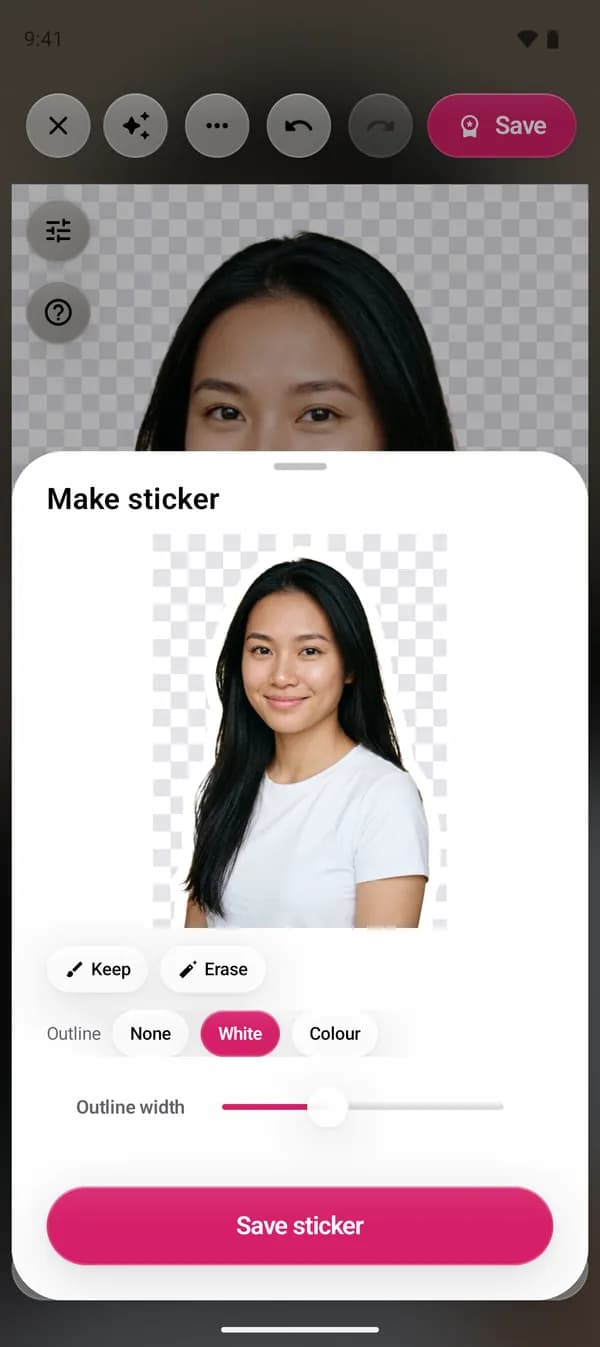
How it works
Open a photo in the editor, tap Decor › Stickers › My stickers, then the + tile (Make sticker) and choose a photo.
lamdep finds the subject and shows it on a checkerboard. Paint with Keep to bring back what it missed and with Erase to remove leftovers.
Choose Outline None, White or Colour, set the Outline width and tap Save sticker. It goes to My stickers and onto your photo.
What you get
The subject is found on your phone; no tracing by hand.
A clean white or colored border that follows every curve.
Your stickers wait in My stickers, the first tab of Stickers.
Stickers are made and stored on your phone and never uploaded.
Tap the + tile (Make sticker) and choose a photo. lamdep runs on-device subject segmentation to find the person, pet or object, crops around it with room for the outline and shows the cut-out on a checkerboard. It works best with one clear subject; if nothing stands out, the app says “Nothing to cut out was found. Try another photo.”
Automatic edges are rarely perfect around hair, fur or a hand touching the background. Choose Keep and paint over a missing ear or tail to bring it back, or choose Erase and brush away a slice of floor or sky. The preview updates after each stroke.
The die-cut look comes from the Outline row: None, White or Colour. White is chosen when the maker opens; Colour adds 10 swatches. Outline width goes from 0 up to 8% of the sticker’s longer side, so the border scales with the sticker.
The outline is drawn on the phone with a smooth edge and saved into the sticker’s PNG with the cut-out, so what you see in the maker is what appears on the photo. The border follows the shape of the subject, not a box around it.
Already removed a background? In the editor’s Cutout tool, choose Remove and tap Save as sticker. The sticker maker opens with the refined subject and the Keep / Erase strokes you painted in Cutout, so you don’t fix the same edge twice.
The two tools do different jobs. Cutout changes the photo you are editing and saves the whole picture, as a PNG when the background is transparent; Cutout saves are part of lamdep Pro, with weekly free saves. My stickers keeps a reusable piece of a photo for other pictures, and saving a sticker there is not a Cutout save.
My stickers is the first tab under Decor › Stickers. Tap one to place it in the middle of the photo, then drag, pinch and rotate it. A selected sticker offers Shadow None, Soft or Long, and Flip; the shadow stays down-right when flipped.
In Layers you can lower the Opacity or pick a blend mode, such as Multiply to let a sticker sink into a textured background. To remove a sticker for good, long press it in My stickers and choose Delete sticker; a draft that still uses it shows a dashed placeholder.
Use cases
Cut out your dog mid-jump, add a thick white border and drop it onto a birthday photo or a weekly pet post.
Give your bestseller an outline in your brand color and place it on promo photos and sale posts.
With their OK, turn each friend into a sticker and arrange them on one photo for an invitation, a farewell card or a team shout-out.
Keep a street-food dish or a souvenir as stickers and add them to the best photo of the day.
Guide
Pick a sharp subject, fully in frame and brighter or darker than its background; a black cat on a dark sofa is hard to cut out. Window light avoids deep shadows, and leaving space around ears, tails and hair keeps them whole.
Spend your brush time where people look: the face, the hands, the top of the head. Fine hair and fur rarely need to be perfect, because an outline of a few percent covers small gaps. For pets, check between the legs and under the chin, where a bit of floor often survives.
White lifts a sticker off busy photos; a color repeated from the picture, such as a scarf or a logo, ties it into the design. Stickers are stored at up to 1,024 pixels on the longer side: crisp at sticker size, not meant to fill a whole high-resolution photo.
Privacy
Everything happens on your phone. You pick the photo in Android’s system photo picker, so lamdep doesn’t need access to your whole gallery. The cut-out uses an on-device model delivered by Google Play services, or the app’s built-in model for people when that one isn’t available. No photo is uploaded and no credits are used.
Your stickers are saved as PNG files in lamdep’s own app storage, up to 200 of them, and are never uploaded or added to your gallery. The photos you decorate with them are saved like any other edit.
Questions
Any photo with a clear subject: a person, a pet, food, a plant or a product. If nothing stands out, lamdep says so.
In the sticker maker choose Outline › White and drag Outline width. Choose Colour for one of 10 colored outlines, or None for a plain cut-out.
Up to 200. Delete one with a long press in My stickers to make room.
Yes. In Cutout, choose Remove and tap Save as sticker. Your Keep / Erase touch-ups come along.
Yes: the cut-out finds animals and objects as well as people. On a phone without that model, the built-in fallback cuts out people only.
Yes, once the cut-out model from Google Play services is on your phone. Without it, the built-in model still cuts out people offline.
lamdep is free to download, and saving to My stickers is not a Pro save. Saving a photo with its background removed in Cutout is part of lamdep Pro, with weekly free saves.
Add text, stickers, doodles and frames
Clean cutouts, new colors or blur
Combine 2 to 9 photos in one layout
Free to download for iPhone and Android. Pro tools and AI credits are optional.