Film filters
Film looks, date stamps and film borders for photos
Film camera
Switch lamdep’s camera to Film, pick one of 17 rolls and shoot. Every frame gets its own grain and light leak, plus a glowing date stamp and film border if you want, and the look stays editable.


Where to find it: Android: lamdep on Google PlayiPhone: lamdep on the App Store
How it works
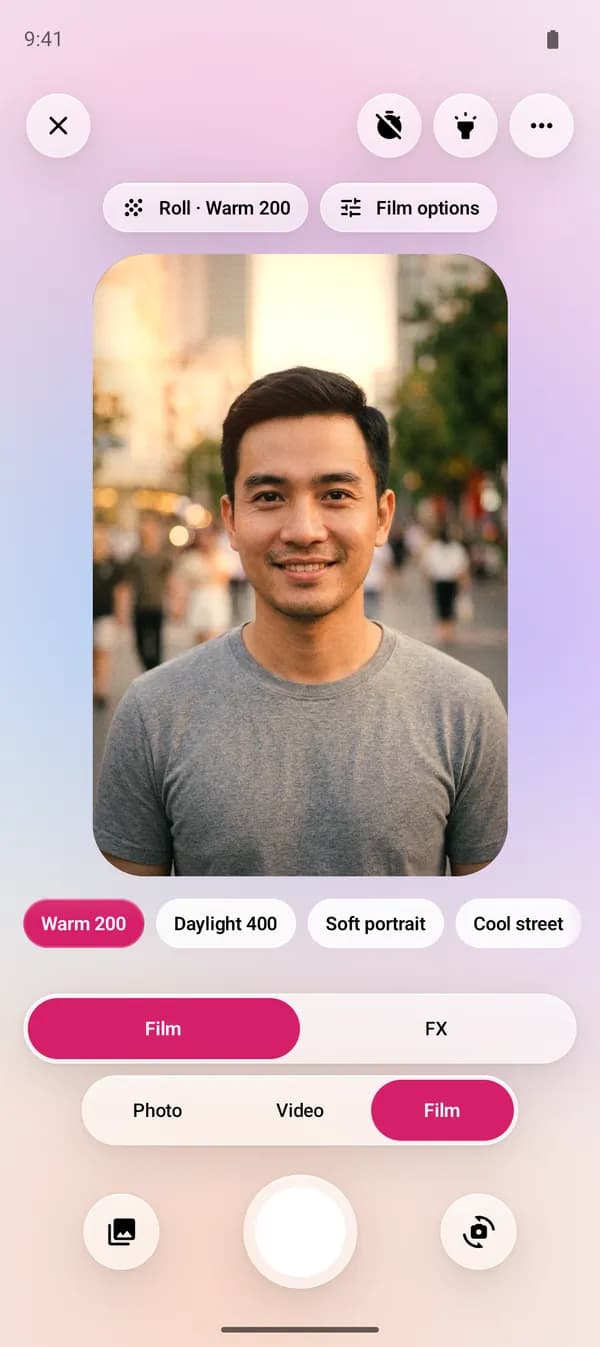
Tap the camera button in the tab bar and choose Film, next to Photo and Video.
Tap Roll to choose a film, then Film options for grain, light leak, border, date stamp and ratio.
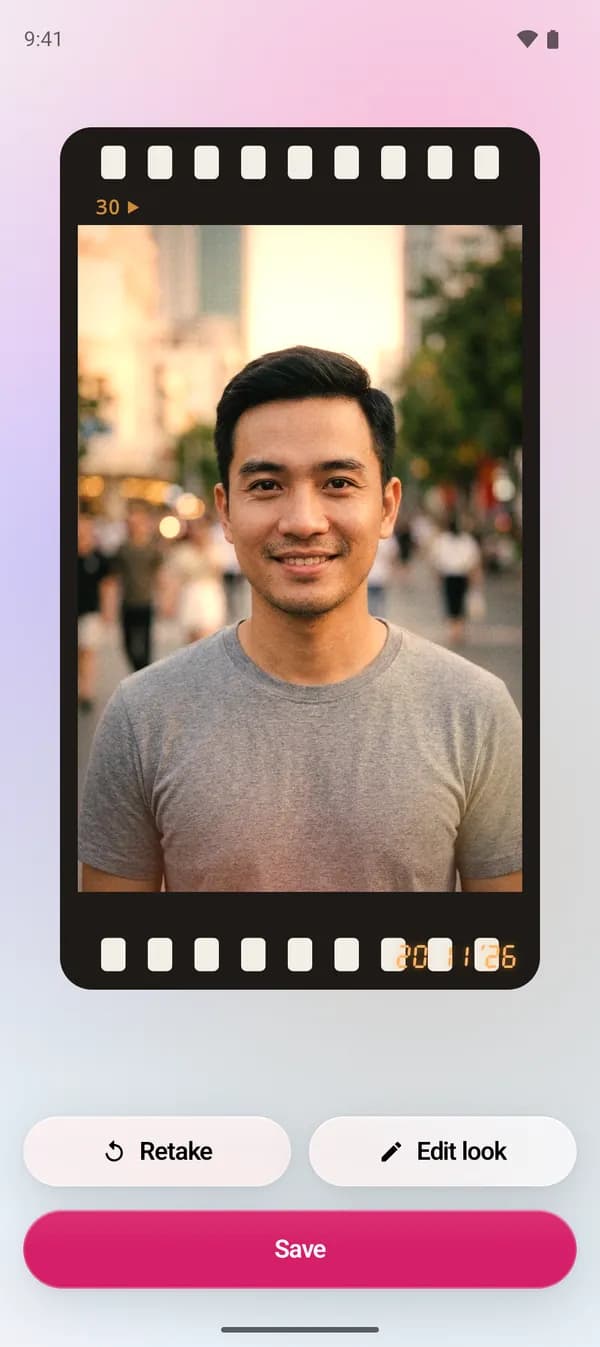
Take the shot, check it on the review screen and tap Save, or Edit look to fine-tune it first.
What you get
On Android 13 and later the viewfinder shows the roll live.
New grain, dust and leaks on each shot, like frames on one roll.
Date stamp, film borders, double exposure and half-frame in the camera.
Film mode never smooths skin or reshapes faces.
Tap the Roll chip at the top of the viewfinder (Warm 200 at first) and the rolls open in a row: 17 looks across color negative, slide, black and white, cine, instant, early digital, toy and infrared-like film, then the rolls you saved in the editor under My rolls. Every name and look is our own.
On Android 13 and later the roll runs live on the viewfinder, and a light reading once a second places the glow around real lamps. In Film options you can switch Grain off, set Light leak to Off, On or Random (about half the shots), or turn Glow around lights off. Each shot is unique is on by default; switched off, every frame shares one grain.
Turn on Date stamp in Film options and each shot prints the moment you took it in glowing amber digits: Segment for the classic seven-segment look, Dots for a dot matrix or Mono. The date is stored with the shot, so later edits keep the day you shot it. In Edit look you can change its color, corner and order, hide the year or add the time.
Border adds one of seven film borders drawn at full resolution, from instant prints to a negative strip with sprocket holes and frame numbers. Ratio sets the crop: 2:3, 3:4, 1:1 or the near-square 6:7, all upright. Flash, the self-timer and the front camera work as in Photo mode.
Exposure in Film options offers None, Double exposure and Half-frame. Double exposure ghosts your first shot over the viewfinder and blends the second into it, like a roll shot twice. Half-frame puts two upright 3:4 shots side by side in one 3:2 frame with a thin dark line between: two angles of a dish, or a face and its view.
Lens adds one effect to every shot: Star filter draws thin spikes from candles, string lights and reflections; Color flash lights the middle of the frame through a colored gel, the edges falling darker. Fisheye stays in the photo editor on purpose, so the camera keeps the scene’s geometry.
With Keep originals on (the default), lamdep keeps each Film shot’s clean original with its recipe: roll, grain, border, date stamp and lens. Re-develop starts from that original, not the finished photo: find it on Film shots in the Library, or at the top of the Film panel when you open a saved shot in the editor. With no changes, it gives back exactly the photo you saved.
Edit look on the review screen does the same before you save: the editor opens on the original with your roll, ready for another roll, a lower amount or custom glow, grain, dust and leaks, each an undo step. Me › Delete kept originals frees the space; saved photos stay in your gallery.
Use cases
Pocket flash, the phone’s flash and a date stamp: party photos with a disposable-camera feel.
One roll and the negative strip border for the whole trip: the set reads like one roll.
Half-frame pairs the dish with the room in one 3:2 frame.
Soft portrait or Warm 200 by a window; no skin smoothing, so faces keep their texture.
Guide
Film looks love light with a direction: a window, the hour before sunset, or the flash after dark for the point-and-shoot look. One main light shows a roll’s colors best.
Treat a roll like a roll: one look and one border per day or event, and the photos hang together as a set. Set Light leak to Random so leaks stay a surprise, and check your phone’s clock when you travel, since the stamp prints its time. 3:4 is closest to a 4:5 feed post; 1:1 and the instant borders suit grids and prints.
Privacy
Film mode runs entirely on the phone: the rolls, borders and date digits come inside the app, the viewfinder look and the light reading are computed on the device, and nothing from the camera is uploaded. There is no face tracking, beauty step, reshaping or AR.
Shots are saved to your gallery in the default format and resolution set in Me. Kept originals and their recipes stay in lamdep’s private storage, never synced, until their saved photo is deleted or you use Me › Delete kept originals.
Questions
Yes. In lamdep, switch the camera to Film, open Film options and turn on Date stamp; each shot prints its capture date.
No. It never smooths skin, reshapes faces or runs AR effects: the photo gets only the roll.
Yes. Use Edit look before saving, or Re-develop later from the Library or the editor’s Film panel, if Keep originals was on.
lamdep is free to download. Six of the 17 rolls (with a crown) and the Star filter are part of lamdep Pro. Try them freely; saving such a shot uses a weekly free Pro save or needs Pro.
The live roll needs Android 13 or later. On Android 9 to 12 the viewfinder stays plain, but shots are still developed with your roll.
On supported phones, Film | FX switches to a separate effects camera with live looks and motion overlays for photos and video; it has its own page.
Yes: use the Film cam widget on your home screen, the Film cam tile in Quick Settings, or Open Film cam when you long-press the lamdep icon.
Film looks, date stamps and film borders for photos
Shoot through live looks and moving overlays
Live beauty, makeup and AR effects
Sketch, glitch, sparkle and light effects, in layers
Free to download for iPhone and Android. Pro tools and AI credits are optional.