Film camera
Shoot through a film roll, with a date stamp and borders
Film filters
Pick a roll and your photo takes on the color, glow, grain and light leaks of film, each a layer you can tune. Then finish it like a print: a glowing date in the corner and an instant or negative-strip border.


Where to find it: Android: lamdep on Google PlayiPhone: lamdep on the App Store
How it works
Tap Retouch photo on Home, pick a photo, then tap Film in the editor’s tool strip, right after Filters.
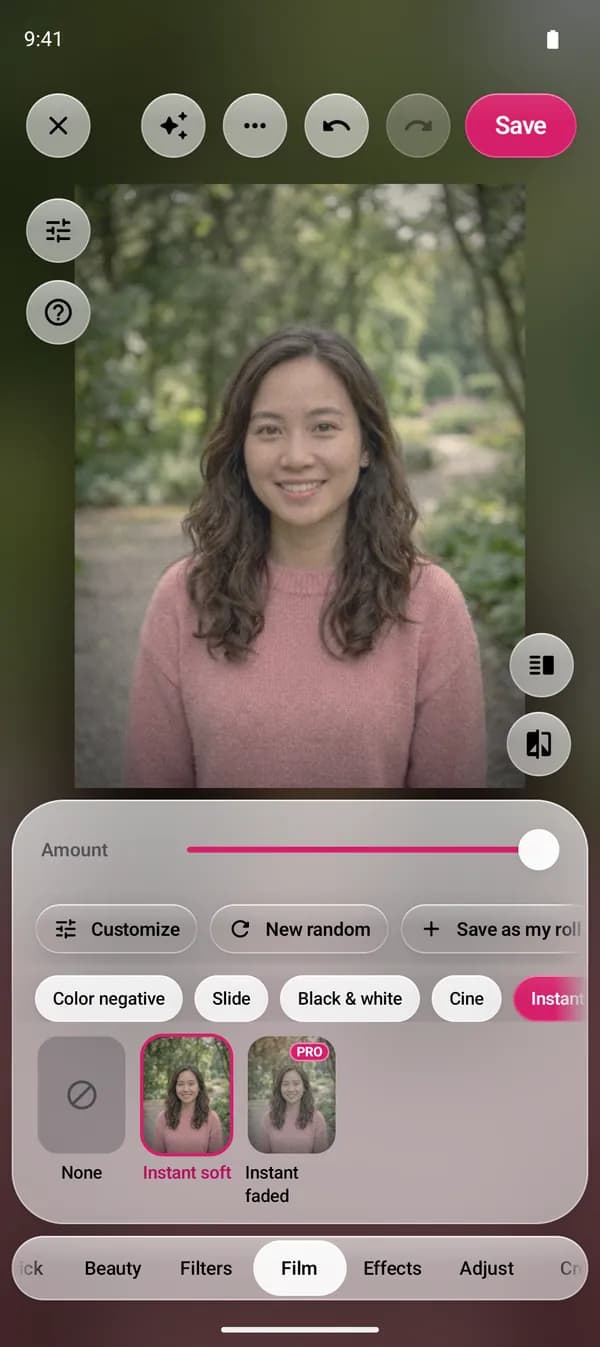
Choose a category, tap a roll and set Amount. Customize changes color, glow, grain, dust and leaks; Save as my roll keeps your version.
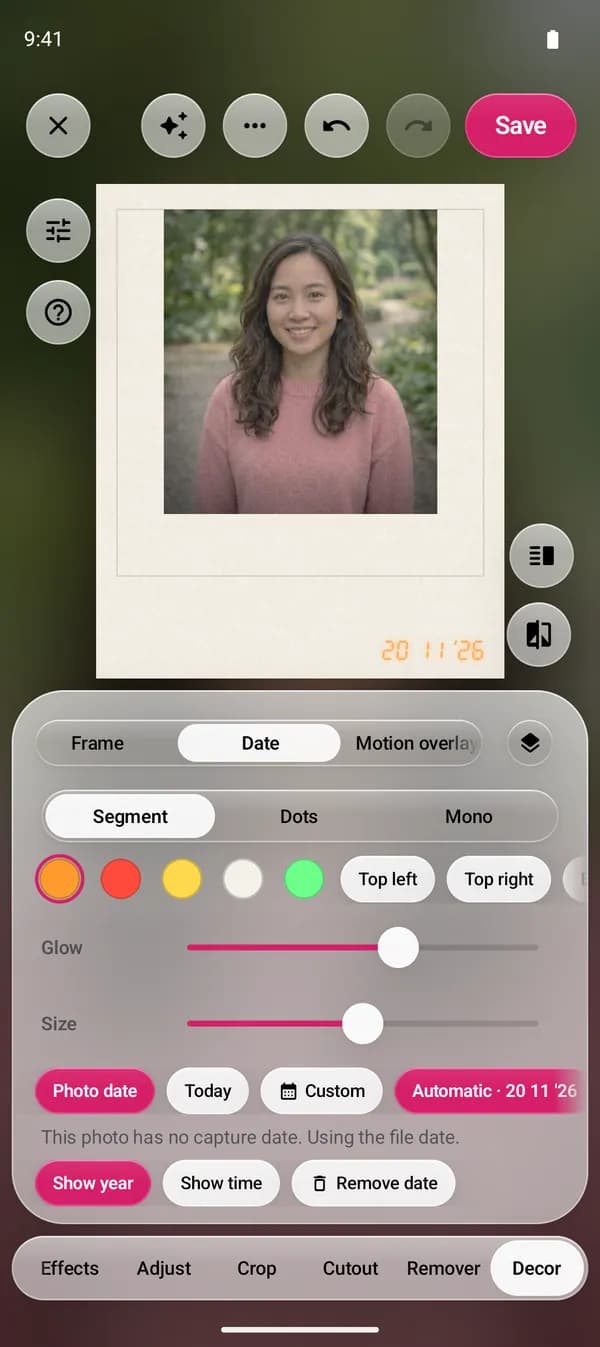
In Decor, open Date and tap Add date, then pick a border in Frame under Film. Tap Save.
What you get
Every roll is a set of our own parameters run through the app’s film engine, with no borrowed presets or brand names.
Each roll shows as a live thumbnail of your own photo.
Segment, Dots or Mono digits with a soft glow, sharp at full resolution.
Undo any step, copy the edit or keep a tuned look in My rolls.
The Film tool groups its rolls by the film they bring to mind. Color negative rolls such as Warm 200 and Soft portrait are gentle on skin; slide rolls like Vivid slide are punchier. Black & white runs from Classic B&W to a sepia-toned print, Cine has Daylight cine and Tungsten night, and Instant gives soft, slightly faded color.
Early digital and Pocket flash recall the compact cameras of the 2000s, Toy adds a plastic-lens look and Infrared-like imitates infrared tones. Every tap on a roll draws a new random seed, so grain and leaks fall differently, and Amount blends the look from 0 to 100%. Eleven rolls are free; the six with a crown are part of lamdep Pro.
Customize opens every layer of the roll on live sliders. Color sets warmth, saturation, contrast and fade. Light holds Glow around lights, the red-orange halo film draws around bright spots, plus bloom and vignette. Grain sets amount and size, and Dust & leaks adds a light leak and dust. New random redraws where they land.
Save as my roll names your version and puts it under My rolls, ahead of the categories; long-press a roll there to delete it. Your rolls also appear in Film cam, so you can shoot through the same look. Some rolls offer Complete the look, which adds a matching border or date stamp, only when you tap it.
Decor › Date puts the glowing date of an old point-and-shoot camera on any photo. Segment draws seven-segment digits like a camera display, Dots a dot-matrix grid, Mono a plain monospaced face. Pick amber, red, yellow, white or green, then set the glow, the size and one of four corners. The digits are drawn as shapes and stay sharp.
Date from sets what is printed: Photo date reads the capture date saved in the photo (if there is none, the app says so and uses the file’s date), Today uses the day you save, and Custom opens a date picker, handy for scans of old prints. Format follows your region on Automatic, or put the year, month or day first; Show year and Show time finish it.
Decor › Frame has a Film row with seven borders. The three instant frames crop the photo to a square, a 3:4 mini or a wide window with a deep bottom margin. Negative strip adds sprocket holes and a frame number on a dark band, Medium format an even edge with two notches, Slide mount a thick card with rounded corners, and Film edge two rows of holes.
Instant and slide borders come in six paper colors, from warm white and cream to black, pink and sky. Border sets the margin width, Tilt turns the print by up to 2 degrees, and a Caption of up to 40 characters fits on instant, strip and slide borders.
Use cases
One roll for the whole trip, copied to every photo, with Photo date printing each picture’s own day.
Pocket flash, a Dots date and an instant frame with a name in the caption.
A saved roll and a paper color that matches your brand, so every post belongs to one set.
Classic B&W or a slide roll in a medium-format or slide-mount border looks at home in a frame.
Guide
Film looks reward good light: window light, late sun or a lit street at night shows off the glow, while dim indoor light makes grain look like noise. Color negative suits people, slide suits landscapes, black and white suits strong shadows.
Restraint sells it. Try Amount around 60 to 80% on busy photos, save light leaks for one or two frames in a series, and keep the stamp small in a bottom corner. Square instant frames keep only the center, so center the subject. For clips, the video editor has its own retro looks, covered on the retro video filter page.
Privacy
The looks, grain, dust, light leaks, date stamp and borders are all generated on your phone from parameters and noise: no texture images are downloaded, no photo is uploaded, and it works offline.
Photo date reads the photo’s own metadata on the device. Your rolls stay in the app on your phone, and saved photos go to Pictures/lamdep in your gallery. Film looks change color and texture only, never faces or bodies.
Questions
lamdep is free to download, and 11 of the 17 film looks are free. The six with a crown are part of lamdep Pro; you can try them before you save.
The date the photo was taken, today’s date or a date you pick.
Yes. Use Copy edits and paste on the others, or save a recipe. With Photo date, each picture prints its own day.
No. Every look, border and name is our own.
Yes. Film cam offers the same 17 rolls and your own rolls live, with the same borders and date stamp.
Yes. All tools › Double exposure blends two photos, then opens the result on the Film tool; Collage has a Half-frame pair layout.
No. It changes color and texture only and never smooths skin or reshapes anyone.
Shoot through a film roll, with a date stamp and borders
Camcorder, home movie and cine looks for your clips
Looks, curves, color grading and masks
Sketch, glitch, sparkle and light effects, in layers
Free to download for iPhone and Android. Pro tools and AI credits are optional.