Depth move
Turn a photo into a 3D parallax clip or a wiggle loop
Make it move
Make it move turns a still photo into a clip of 3 to 10 seconds. Your effects glow and sparkle, snow or dust drifts through the frame, and a slow virtual camera zooms or pans. Save it as a video, a motion photo or a GIF, all made on your phone.


Where to find it: Android: lamdep on Google PlayiPhone: lamdep on the App Store
How it works
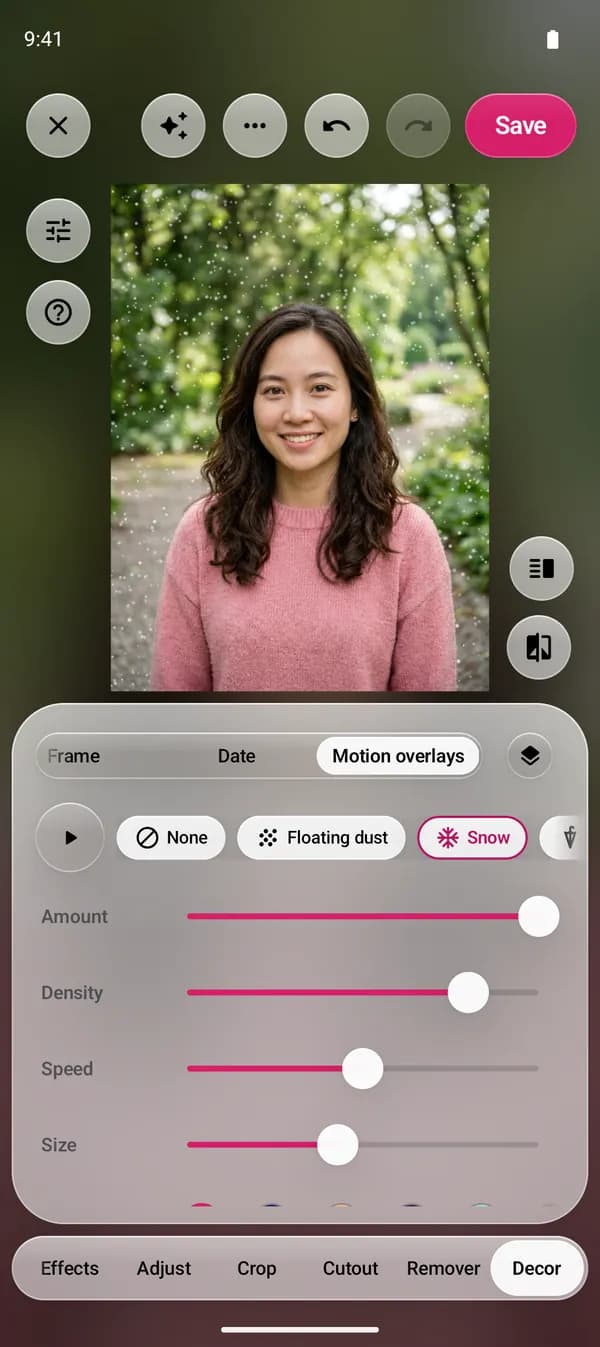
In the lamdep editor, add an effect such as Soft glow or Twinkle in Effects, or an overlay such as Snow in Decor › Motion overlays. A plain photo works too.
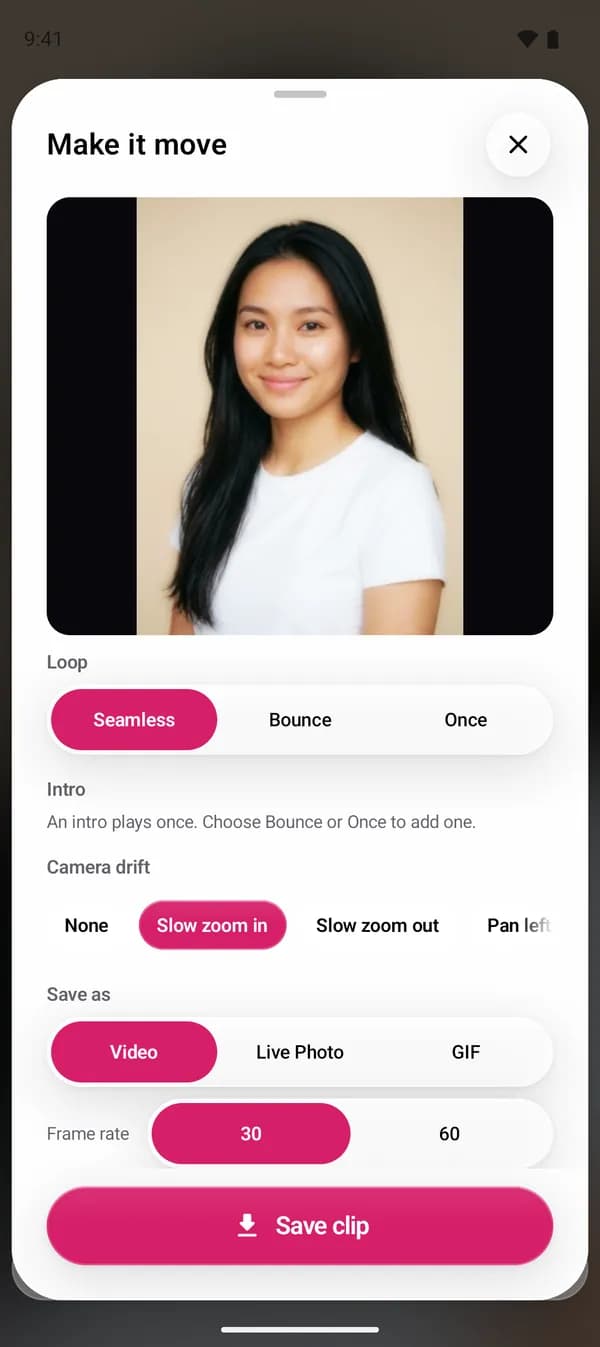
Choose a Length, a Loop (Seamless, Bounce or Once), an optional Intro and a Camera drift.
Under Save as, choose Video, Live Photo or GIF, set the frame rate and resolution, then tap Save clip.
What you get
Each effect layer plays its own animation: a glow breathes, sparkles twinkle, glitches flick.
Eight overlays, from Snow to Film burn, that can fall behind the person instead of across a face.
Zoom, pan or orbit gently, with no black edges when the picture moves.
A video for Reels or Shorts, a motion photo for your gallery, a GIF for chats.
Make it move does not invent new frames or guess how a person would move. It animates what is already in your edit. Each effect layer from Effects can carry its own Motion, such as Fade in, Pulse, Flicker or Loop. Motion overlays add moving particles and light, and Camera drift moves a virtual camera over the picture.
Faces and bodies are never reshaped or animated, and text, stickers, a frame or the date stamp stay fixed on top, exactly where you placed them. To give the scene depth instead, Depth move in the video tools moves a 3D-style camera between the subject and the background.
Loop decides how the clip ends. Seamless blends the end into the start, so it repeats with no visible jump: right for stories that replay, backgrounds and GIFs. Bounce plays the motion forward, then back. Once plays it a single time. With Bounce or Once you can add an Intro (Fade in, Glitch in or Light sweep) that brings the effects in at the start, and choose which effects take part.
Pick GIF under Save as when the clip has to play in a chat or on a page that takes no video. A GIF is up to 720 px on its long side, runs at 15 frames per second and has no sound, so a 3-second loop is 45 frames. For a sharper picture, smoother motion or music, save a video.
Decor › Motion overlays offers eight overlays drawn by lamdep itself, with no stock footage inside. Tap Play to watch one move, then set Amount, Density, Speed and Size, a Colour (its own or one of eight palette swatches) and a Blend: Screen, Add, Overlay or Soft light.
Turn on Behind subject and lamdep finds the person or object on your phone, so snow falls behind them, not across their face. A saved photo shows one still frame of the overlay; Make it move plays it between your effects and your text or stickers. Overlays are free to use.
Video is saved in 1080p, or in 4K where your phone's encoder can make it; the 4K choice only appears on those phones. Pick 30 or 60 frames per second. If you have installed a music pack from the Store, a Music row puts a track under the clip, cut to its length.
On Android, lamdep saves the Live Photo option as a motion photo: a still picture that carries the first 3 seconds of the clip, played back by galleries that support motion photos. After saving a video, Open in video editor starts a new project with the clip on the timeline.
Use cases
A product shot with Glitter fall and a slow zoom in, saved as a 5-second video for a story or a shop post.
A landscape with a slow pan and Floating dust in the sunlight, as the opening shot of a trip video.
A portrait with Snow behind the subject and a Fade in intro, sent as a GIF that plays right in the chat.
A Seamless clip with Bokeh drift that repeats without a jump, for a profile video or a shop screen.
Guide
Choose a photo with space around the subject: a drift needs room to travel, and a clean background shows overlays best. Slow zoom in suits portraits and products, a pan suits wide landscapes.
Keep the motion calm: one moving effect and one overlay are usually enough, so lower Density and Speed before raising Amount. Stories and Reels replay on their own, so a Seamless clip of 5 or 8 seconds feels endless, while 3 seconds keeps a GIF small.
Match the file to its destination. GIF holds at most 256 colours per frame, so skies and other smooth gradients can band; use video when quality matters. 60 fps makes pans smoother, 30 fps keeps files smaller, and 4K pays off only where the platform keeps it.
This Short runs through the steps above on one portrait: snow goes behind the person, Make it move opens from the save sheet, a length, a loop and a camera drift are picked, and the clip is saved. You get a seamless loop of 3 to 10 seconds, or a Live Photo or a GIF instead.
Privacy
Everything in Make it move runs on your phone: the effects, the overlays, the camera drift and the encoding to video, motion photo or GIF. Behind subject finds the subject with on-device segmentation. Your photo is not uploaded and no AI credits are used.
Finished clips are saved to your phone's gallery, and temporary files stay in the app's cache while a clip is made. Music comes only from packs you installed from the Store, and Open in video editor keeps the clip in a new project inside the app.
Questions
No. Make it move animates your effects, motion overlays and a virtual camera. It creates nothing new and never moves or reshapes a face or body.
3, 5, 8 or 10 seconds; 5 seconds is the default. Choose it under Length in the Make it move sheet.
Yes. Choose GIF under Save as: up to 720 px on the long side, 15 frames per second, no sound.
lamdep saves it as a motion photo holding the first 3 seconds of the clip. Galleries that support motion photos play it.
Yes, from the music packs you have installed from the Store. GIFs have no sound.
lamdep is free to download, and motion overlays are free. A clip follows the photo's save rule: if the photo uses Pro effects or looks, you need lamdep Pro or one of the free Pro saves each week.
Turn a photo into a 3D parallax clip or a wiggle loop
Sketch, glitch, sparkle and light effects, in layers
Glitch, echo, light and snow effects as timeline clips
Multi-track timeline, effects and video beauty
Free to download for iPhone and Android. Pro tools and AI credits are optional.