Film filters
Film looks, date stamps and film borders for photos
Retro video looks
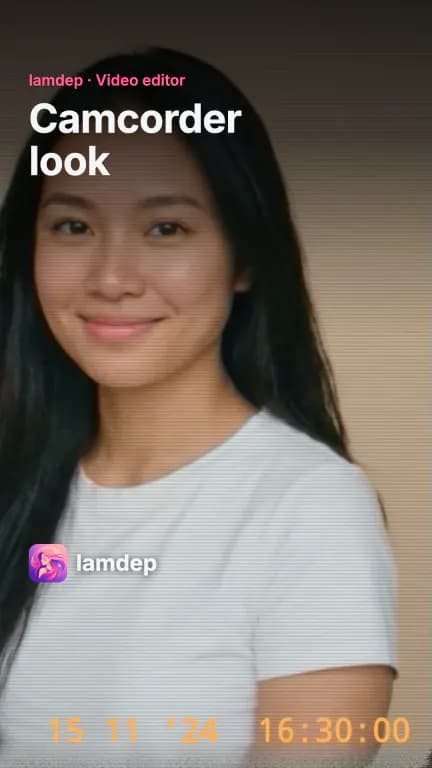
Camcorder, Home movie and Cine turn a clip from today’s phone into something that feels found in a drawer: tape-era colour with a ticking date, warm grainy family film, or a gentle cinema grade. Each look is a clip on your timeline, so you decide where it starts, how strong it is and when it fades.


Where to find it: Android: lamdep on Google PlayiPhone: lamdep on the App Store
How it works
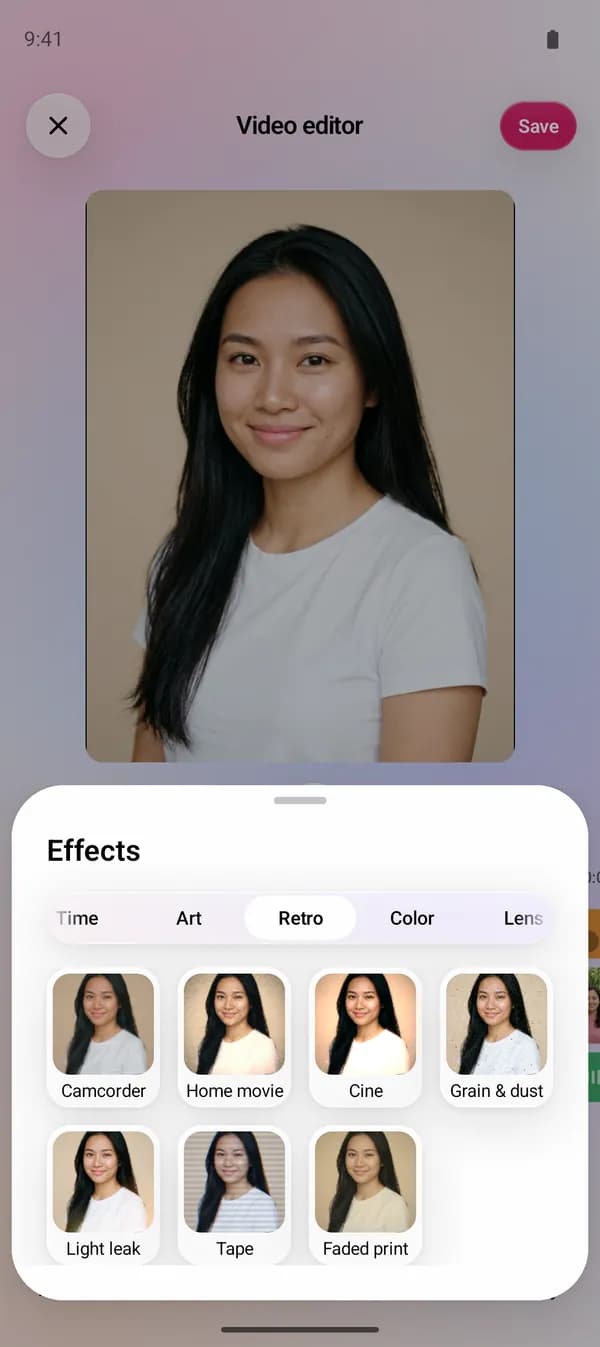
On Home, tap All tools › Edit › Video editor and start a New project with your clips. Tap Effects in the toolbar, then the Retro chip.
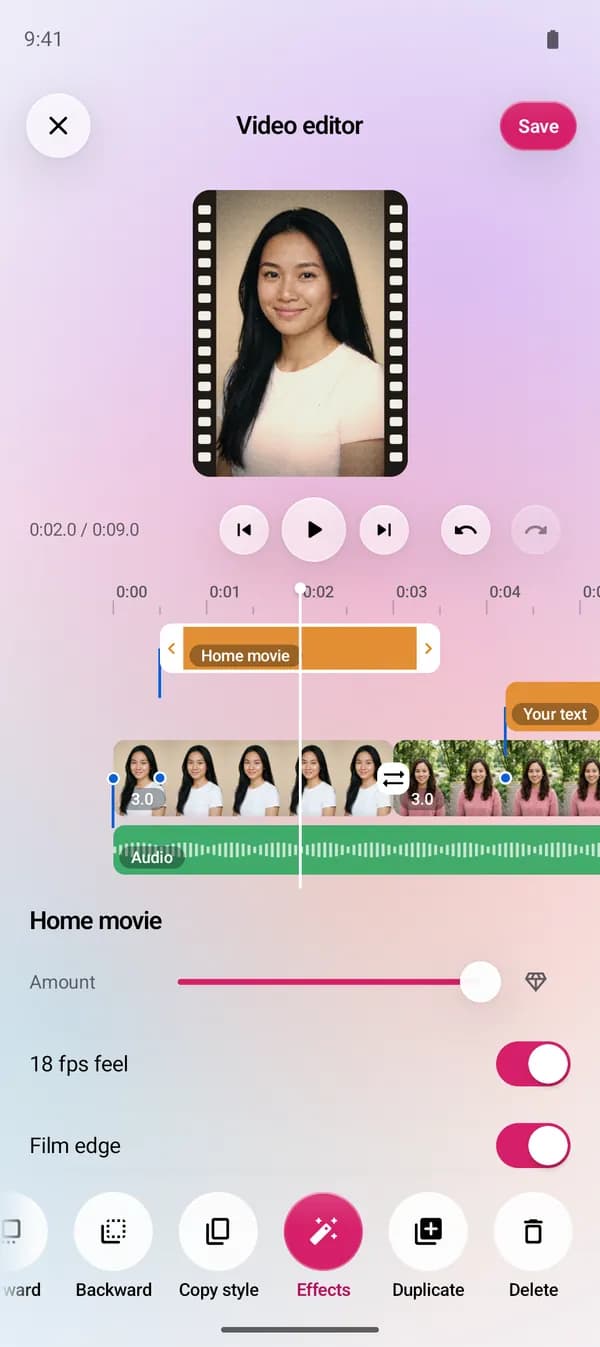
Tap Camcorder, Home movie or Cine. A 3-second clip lands at the playhead with its panel open: set Amount, switch the options, and drag the clip’s ends to cover as much of the video as you like.
Tap Export, choose your settings and save. The video goes to Movies/lamdep, looking exactly as it did in the preview.
What you get
Colour, grain, optics and movement are layered together: one tap gives a finished style, not a single filter.
Scan lines and dust change every frame, the picture weaves and flickers, and the date ticks on as the video plays.
A keyframable Amount, each look’s own switches, and a choice between the whole video and the main track.
The looks are free on video and render on the phone, in the preview and in the export.
Camcorder recreates the home videos people shot on tape in the 1990s. Blacks are lifted, the optics are soft, colour bleeds sideways and slips out of register, rows wobble, fine scan lines cross the picture and a ragged head-switching band changes on every frame. It is a VHS-style look built from our own maths.
Running date is on for every new Camcorder clip: amber digits in the bottom-right corner with the date and the 24-hour time to the second, ticking as the video plays. The app reads the recording date of the video under the look, so a party filmed at 19:42 shows 19:42 and counts on; with no date to read, it starts from the moment you added the look. Switch it off for a clean frame.
Home movie gives a clip warm, faded colour and coarse grain; dust changes with each frame, a round vignette darkens the corners and highlights glow. The picture weaves a hair and the brightness flickers gently. Where the clips under the look cut from one to the next, a light leak flares, as it did where old reels were spliced.
18 fps feel is on for a new Home movie clip: each picture is held on an 18 fps grid, so movement steps like old film while your video keeps its length and frame rate. Film edge adds a strip of film with sprocket holes along two sides; on a vertical video it runs down the long sides.
Cine is the quietest of the three. A gentle S-curve adds contrast without crushing faces, shadows lean teal and highlights warm, lights get a soft halation and bloom, and fine grain and a soft vignette hold the frame together. It suits a city walk, a short trailer or a wedding’s slow moments.
Its option, Counter, shows white segment digits in the top-right corner as hours, minutes and seconds, counting from 00:00:00 where the Cine clip starts. It gives the feel of a rehearsal tape or a behind-the-scenes reel.
The same Effects sheet has a Signal chip with six effects of broken or vintage pictures. A tap adds a 3-second effect clip with Amount, the effect’s own controls (such as Band size and Spread for Signal glitch), a Blend mode and the choice between Whole video and Main track.
They mix well with the retro looks. A second of Tracking tear on a cut feels like a tape being fast-forwarded, Tube bends the picture into an old screen, Crunch gives the blocky colour of an over-compressed early web video, and Pixel drift sorts runs of bright pixels into streaks.
Use cases
Home movie with Film edge over a string of short clips: every cut gets its own small flare of light.
Camcorder with the running date, plus a burst of Signal glitch on each beat drop.
The running date shows the day and time each clip was filmed, so the trip tells its own story.
An anniversary sale or a “how we started” story in a camcorder look that stands out among glossy videos.
Guide
Retro looks work best on footage that behaves like the era: handheld, natural light, people talking to the camera. With 18 fps feel on, pan slowly: fast pans step visibly.
Start at full Amount, then pull it back to around 60–80 % for close-ups of faces. To drift back in time, keyframe Amount from 0 to 100 % over a second or two with the diamond next to the slider. Choose Main track to keep titles and stickers crisp above the look, or Whole video when the text should look burnt into the tape.
Grain and scan lines are fine detail that compression can smear, so export at a high resolution and upload that file, not a copy saved from a chat. On a 9:16 video for Reels, Shorts or TikTok, keep text away from the long sides if Film edge is on.
Retro looks sit on the timeline as effect clips, so you decide how much of the video they cover. In this Short the Camcorder look runs with its date stamp and its Amount is set, then Home movie and Cine show their film edges and warm light before the export.
Privacy
The looks and the Signal effects are drawn on your phone, in the thumbnails, the preview and the export. There is no cloud processing and no credits, and your clips are not uploaded to apply a look.
The running date is read from the video file on your phone and only appears in the picture while the option is on. Projects stay in the app’s storage on your phone, and exported videos are saved to Movies/lamdep.
Questions
Yes. In the video editor, open Effects › Retro, tap Camcorder and stretch the clip over the part you want.
Yes. Camcorder, Home movie and Cine are free on video, and lamdep is free to download.
From the recording date of the video under the look, plus the time into the clip. Without a date, it starts from when you added the look.
No. It is always amber, bottom right, in your region’s date order with the 24-hour time. You can turn it on or off.
No. The video keeps its length and frame rate; each picture is held on an 18 fps grid. In an HDR project the look is drawn without that hold.
No. Every look, texture and edge is our own design, with no camera or film names.
Film looks, date stamps and film borders for photos
Glitch, echo, light and snow effects as timeline clips
Shoot through a film roll, with a date stamp and borders
Free to download for iPhone and Android. Pro tools and AI credits are optional.