Color & filters
Looks, curves, color grading and masks
Video color grading
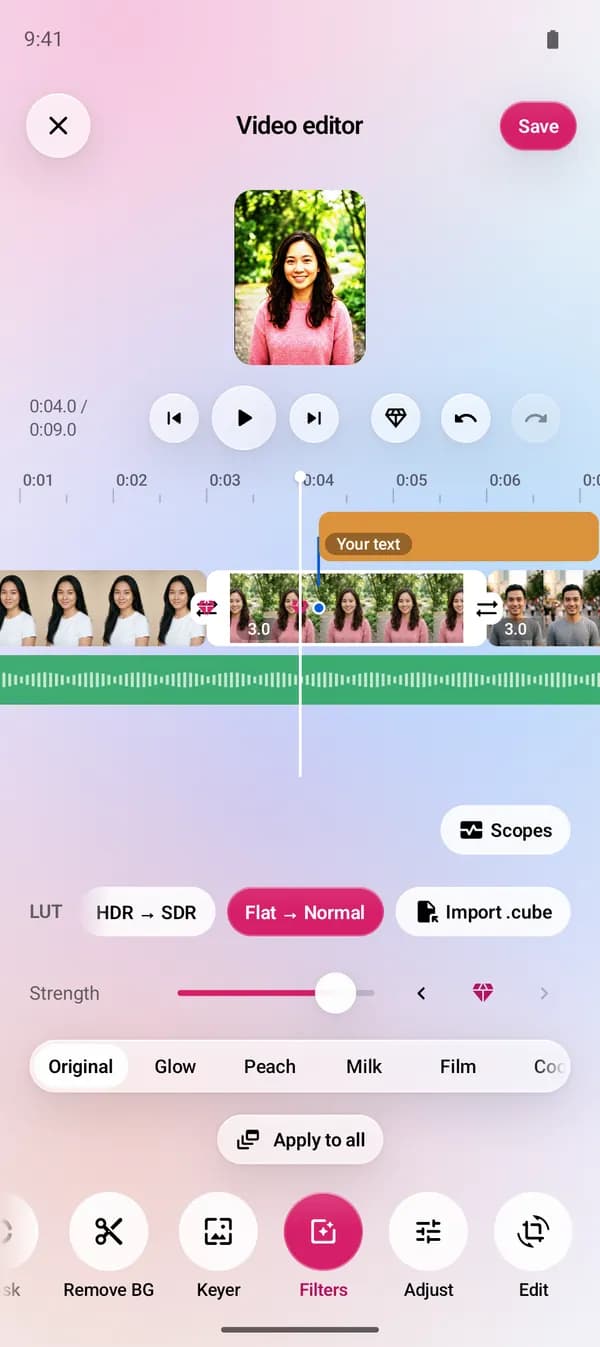
Pick a clip in lamdep’s video editor, open Filters and put a LUT under your look: turn Log or flat footage into normal colors, or load your own .cube file. Check the grade on the scopes, then save in standard range or in HDR.


Where to find it: Android: lamdep on Google PlayiPhone: lamdep on the App Store
How it works
On Home, tap Video editor and start a New project. Tap a clip in the timeline, then Filters: the LUT row comes first.
Tap a conversion, one of your files or Import .cube, and set Strength. Add a look, fine-tune in Adjust and tap Scopes to check.
Tap Save. In an HDR project, leave the HDR switch on for an HDR file or turn it off for a standard version, then tap Export.
What you get
When lamdep recognises an Apple Log clip, it offers to convert it: Convert or Not now.
Imported .cube files are shared with the photo editor’s profiles.
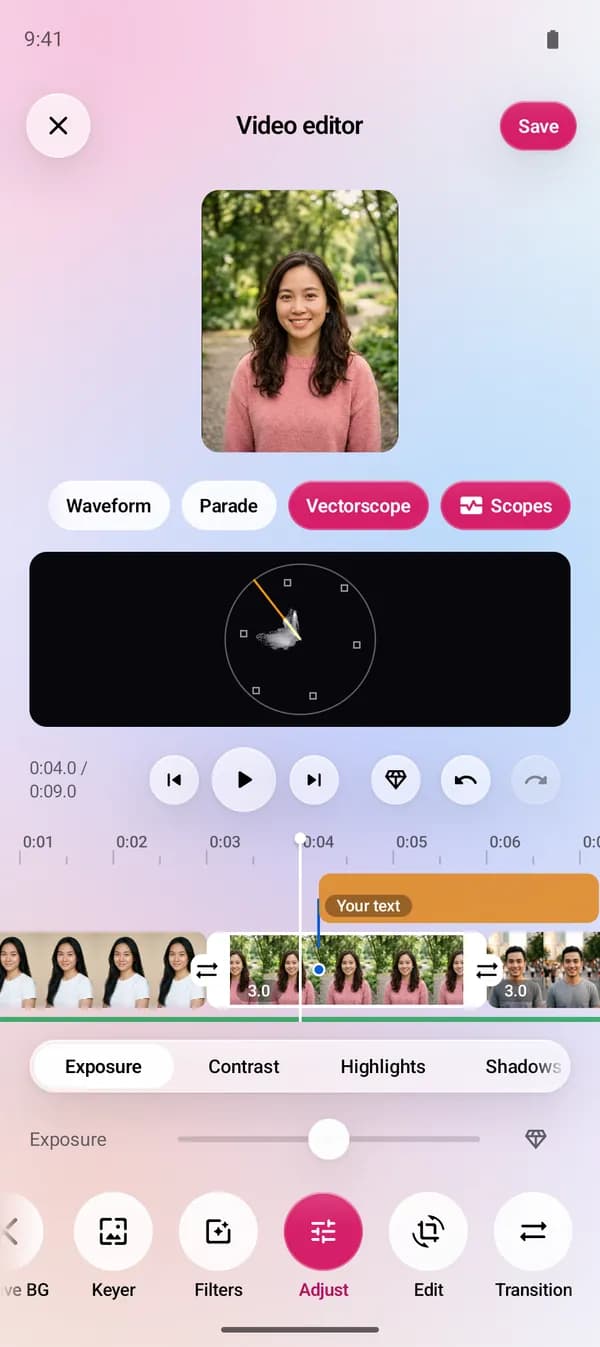
Four scopes read the preview frame while you grade.
Save 10-bit HDR where the phone has an HDR encoder, or a standard version.
The LUT row sits at the top of a video or photo clip’s Filters panel. Import .cube opens the system file picker; lamdep reads 3D LUTs in .cube format from 2 to 65 points per side, and refuses 1D LUTs and other files with “This file isn’t a 3D LUT we can read.”
Strength runs from 0 to 100 % and can be keyframed, so a LUT can fade in across a shot. The LUT is applied first, then the Filters look (Intensity up to 200 %), then Adjust: convert, then style, then fine-tune. Adjustment layers take looks but no LUT. If a .cube file is deleted from the phone, the clip plays on without it.
Log footage is recorded flat on purpose: low contrast and muted color keep detail in highlights and shadows, but the picture looks gray until it is converted. The first time you add a clip recorded in Apple Log, lamdep asks “This clip is in Log. Convert to normal colors?” Convert puts Apple Log → Normal on the clip; Not now leaves it untouched. It asks once; after that, choose the conversion in Filters.
The built-ins are 33-point LUTs generated from published transfer curves: Apple Log → Normal, HDR → SDR for HLG pictures and Flat → Normal for a generic flat picture. Each maps wide Rec.2020 colors to standard Rec.709 and rolls highlights off gently instead of clipping them. For another camera’s Log profile, import the .cube its maker publishes.
Tap Canvas with nothing selected to find the Color row: Auto, SDR, HDR (HLG) and HDR (PQ). Auto follows your first clip: the project becomes HDR when that clip was filmed in HDR and the phone can save HDR video. An HDR badge in the top bar shows while the project is HDR.
In an HDR project, the Save sheet’s HDR switch is on by default and writes a 10-bit HEVC file tagged HLG or PQ; off saves a standard version. A phone without a 10-bit HDR encoder says it will save a standard version, and HDR also needs at least one clip in the project’s HDR format. On Android the editor preview is shown in SDR, so check highlights on the scopes.
Tap Scopes at the top of Filters or Adjust and a strip opens under the preview, never over the video. Histogram counts pixels by brightness. Waveform plots brightness across the frame, left to right. Parade splits it into red, green and blue, so a color cast stands out. Vectorscope plots hue around a circle and saturation from the centre, with six color-bar targets.
The vectorscope’s skin tone line marks where skin of every complexion tends to fall: if faces drift towards green or magenta after a warm look, the trace leaves the line. Scopes update about 10 times a second while playing and on every frame while paused. In an HDR project they show the HLG or PQ signal, even though the Android preview is tone-mapped.
Use cases
Convert every Log clip with one LUT and lower the strength on contrasty shots.
Match flat and standard clips on the parade, then paste one grade across the trip.
Warm the image and keep faces on the skin tone line.
Keep an HLG clip in HDR for bright skies, and save a standard copy for chat apps.
Guide
Expose Log carefully: a flat picture hides blown highlights until you convert it. Lock exposure on the face and keep skies below the top of the waveform, but don’t underexpose, because lifting dark Log footage brings up noise. Convert at 100 % first and lower Strength only if the scene looks too contrasty.
Grade one clip, then copy it: tap Copy style, select the next clip, tap Paste style with Color ticked, then This clip or Apply to all. Color carries the LUT, look, adjustments and their keyframes. Paste a Log conversion only onto clips shot in the same profile.
Choose HDR or SDR for where you post. HDR shines on HDR screens and on platforms that play HDR uploads, such as YouTube; many messaging apps and older phones convert it and can make it look flat, so save a standard version for those. Keep strong colors inside the vectorscope targets: oversaturated reds break up first after compression.
Privacy
Grading runs on your phone: LUTs, looks, adjustments, scopes and HDR conversion are computed by lamdep’s own engine on the device. No clip, frame or LUT file is uploaded, and the built-in conversions ship inside the app.
An imported .cube file is copied into the app’s storage with your photo profiles; the original stays where it was. Saved videos go to Movies/lamdep on your phone.
Questions
Yes. Select the clip, open Filters and tap Import .cube. lamdep reads 3D LUTs in .cube format.
The first time, lamdep offers to convert it to normal colors. You can always pick Apple Log → Normal in Filters.
Yes, on phones with a 10-bit HDR encoder; others save a standard version.
On Android the preview is shown in SDR. The saved file keeps HDR.
Select a clip, open Filters or Adjust and tap Scopes.
Yes, with Copy style and Paste style, or Apply to all in Filters.
lamdep is free to download, and these tools carry no Pro badge in the video editor.
Looks, curves, color grading and masks
Multi-track timeline, effects and video beauty
Camcorder, home movie and cine looks for your clips
Free to download for iPhone and Android. Pro tools and AI credits are optional.