Selfies
Natural-looking selfies, live and after the shot
Use case · Video creators
Short talking videos are mostly preparation: what you say, how you look saying it, and captions for people watching without sound. This routine keeps every step in one app, from the script on the screen to the finished file.


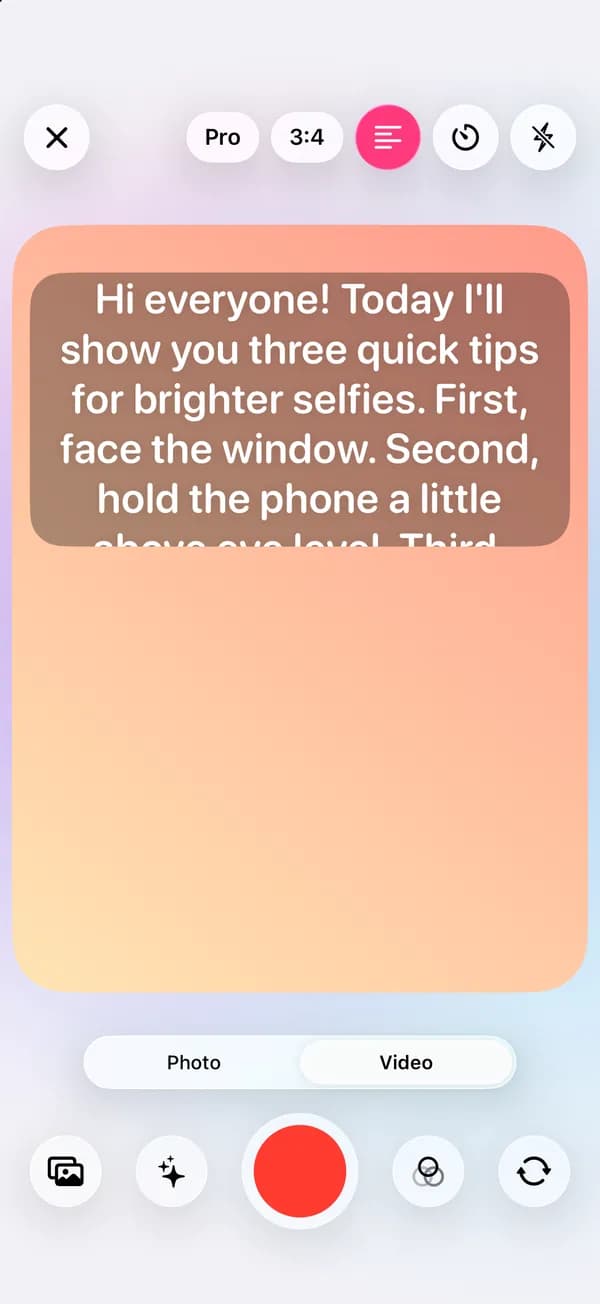
Step by step
Paste your script into the teleprompter. It scrolls at the top of the screen, right by the front camera, so your eyes stay near the lens. Set the speed and size, add a countdown, and tap to pause. It is free.
More about TeleprompterIn Video mode, live beauty stays on while you record, so the clip looks like the preview. Save your usual settings as a look and switch in one tap; AR effects are there for lighter videos.
More about Beauty camera & ARCut the pauses, split long takes, add B-roll on a second track, music, text and transitions. Grade the colour and apply video beauty to the whole clip. Export as video in several resolutions, or as a GIF.
More about Video editorAuto captions transcribe English or Vietnamese on supported phones, word by word. Pick a style, fix any word, and delete words in the transcript to cut them from the video.
More about Auto captionsGood to know
Short sentences, one idea each. Read the script aloud once before recording and cut anything you stumble over.
Use a smaller text size so the lines sit close to the camera. Viewers notice eyes that travel across the screen.
A short silent take in the same room helps you judge the background noise and gives you room for cuts.
Many people watch without sound. Captions also make the words easier to follow for everyone.
Guide
Set up once, record many times. Put the phone at eye level on a stack of books or a small tripod, about an arm's length away, and face a window or a lamp so the light falls on your face. A plain wall or a tidy shelf behind you is enough.
Record in short sections, one point at a time. If you trip over a sentence, pause, and say it again from the start; you'll cut the mistake on the timeline. Keep the teleprompter speed a little slower than feels natural: it is easier to speed up the edit than to rush the reading.
In the edit, cut every pause longer than a breath and every repeated take. Add a second track for a screenshot, a product or a cutaway when you mention something, and keep music low under the voice.
Captions are the last step because they follow the final cut. Read them once against the audio and fix names and numbers, which speech recognition gets wrong most often. Then export, and keep the project so you can make a shorter version later.
Sound matters more than the picture. Viewers forgive a slightly soft image, not a voice lost in echo. Record in a room with curtains, a rug or a sofa, close the window, and keep the phone close so the microphone stays near your mouth. If you use an external microphone, record a short test clip and listen to it with headphones before you record the whole script. Background hum from a fridge or an air conditioner is easy to miss while you talk and hard to remove later, so switch them off for the take if you can, and remember to switch them back on.
Plan for more than one format. A vertical clip for stories and short-video feeds can also become a square post or a wide video: auto reframe in the video editor keeps you in the frame when you change the ratio. Keep your script, the project and the exported files together, and note what worked, such as the length, the opening line and the caption style. The next video will be quicker to make.
Questions
No. The script is only on your screen; it is not recorded.
Yes. Live beauty stays on in Video mode, so the recorded clip matches the preview.
English and Vietnamese first, depending on what your phone's speech recognition supports. Captions can also show a translated second line.
Yes. It is part of the camera and needs no account.
On Android, yes: the export continues in the background with a progress notification, and you can cancel it from there.
Natural-looking selfies, live and after the shot
A clean, well-lit photo for every profile
Restore, sharpen and share old family photos
Collages, text and captioned videos for your feed
Better light and focus, still clearly you
Clean up, match the colour, cut a highlight video
Fewer tourists, frames that fit, a short reel
Make-up, a gentle retouch, titles and a collage
Sharp pets, soft backgrounds, no glowing eyes
lamdep is free on Google Play and the App Store, with one account for both.